
Last updated: November 19, 2026
Key Takeaways
- The approval process should define reviewers, order, and the final decision point.
- Set up each stage with one owner, one deadline, and one source file.
- Split review by role, not by seniority.
- Manage comments with a type, a place, and a deadline.
An AI tools newsletter approval process keeps contributors from publishing a bad link, a wrong claim, or a messy draft. Quick answer: set one editor owner, one fact-check signoff, and one final approval step before the issue leaves draft. In this guide to how to set up an AI tools newsletter approval process with contributors, the steps below show how to route drafts through review without turning every issue into a six-person email pileup.
What the approval process needs to do
Picture this: you have three contributors, a draft in Google Docs, comments in Slack, and one editor trying to guess which version is final. The approval process has to answer who reviews what, in what order, and where the final decision lives. Without that, the work turns into email review loops and lost changes.
A good newsletter approval process does four jobs. It assigns each issue to one editor, routes it through fact check signoff, keeps comments in one place, and locks the version that gets sent. That sounds simple, but the handoff between writers and editors is where most teams lose time.
Use a style guide before you use a calendar. A style guide gives the team shared rules for tone, capitalization, source format, and how to describe AI tools without drift. If the guide is vague, every approval turns into a debate about commas and product names.
- Owner: one editor approves the final file.
- Review stages: draft review, fact check signoff, final approval.
- Working file: one source of truth in Google Docs or Notion.
- Decision trail: comments stay visible until the issue is closed.
The truth is, this process is for teams that publish with more than one person in the loop. It is not the right setup for a solo writer who wants a faster self-editing system. For that, a simpler workflow is better.
How do you set up the AI tools newsletter approval process?
You set it up by giving each review stage a clear owner, a clear deadline, and one place where the current draft lives. That means no scattered edits in email, no “latest_final_v7” files, and no reviewer guessing which note still matters.
Start with the draft tool. Google Docs works well for comment threads and version history. Notion can work too, especially if your team already keeps issue notes there, but it is easier to lose track of final copy if comments, checklists, and draft text are split across too many blocks.
Use this order:
- Writer drafts in one file. The writer posts the first draft in Google Docs or Notion and tags it as the current version. The result should be one editable source, not three copies.
- Editor does structure review. The editor checks headline, angle, product order, and whether the issue matches the style guide. This catches big problems before line edits start.
- Fact checker signs off on claims. Someone verifies tool names, feature claims, pricing language, and any “best for” statement that sounds like a promise. The result is a draft with fewer risky claims.
- Writer resolves comments. The writer answers comments in the same file, marks what changed, and leaves unresolved items visible. This keeps the loop tight.
- Final editor approval closes the draft. The editor confirms the version is ready for send and removes old review marks.
- Slack gets the status, not the draft. A short Slack message says “Approved” or “Needs revision” with a link to the file. Slack should move the work, not hold it hostage.
- Email review loops stay short. If a decision needs more than one back-and-forth, move it back into the doc so the thread doesn’t sprawl.
Because of that, this sequence works even when contributors are in different time zones. The catch is that you need a named owner for each step. If “everyone reviews it” is the rule, nobody does.
Who should review what in an AI tools issue?
You should split review by job, not by rank. A senior editor does not need to fact check pricing language, and a contributor who wrote the intro should not be the only person approving the close.
Set up three roles:
- Writer: owns the draft, answers comments, and updates copy.
- Editor: checks voice, structure, and whether the issue fits the newsletter’s editorial plan.
- Fact checker: checks claims that could mislead readers, especially about features, availability, or comparisons.
That division matters because AI tools coverage gets messy fast. A sentence like “this tool generates slide decks from prompts” sounds ordinary until someone checks whether the feature exists in the exact plan being mentioned. The approval process should catch that before publish, not after a reader points it out.
Use a 24-hour review window if your schedule allows it. Short windows keep the issue moving, but they also force contributors to focus on what matters. Long windows make drafts stale, and stale drafts are where duplicate comments pile up.
A simple rule helps: the editor handles editorial judgment, the fact checker handles claims, and the writer handles fixes. No one should “clean up everything” because that hides ownership. It also makes version control harder when the next person opens the file.
- Editor comments: structure, clarity, sequence, and tone.
- Fact-check comments: tool names, product claims, dates, and sourcing language.
- Writer replies: accept, revise, or push back with a reason.
- Final signoff: one person marks the draft ready.
Here’s the catch: if the same person writes and approves every issue, the process is not really an approval process. It is self-review with extra steps.
How do you manage comments without turning the draft into chaos?
You manage comments by giving each comment a type, a place, and a deadline. A comment without those three things turns into a sticky note nobody owns.
Use a simple comment rule in Google Docs or Notion:
- One comment = one issue. Do not stack five requests into one thread.
- One decision per comment. Ask for a change, a fact check, or a choice—not all three.
- One owner per comment. The writer answers, or the editor closes it.
- One deadline. If a comment sits open past the review window, the editor decides whether it stays or goes.
This is where email review loops usually fail. Email is fine for a heads-up, but it is bad for line-by-line work because replies split across inboxes. The next person has to reconstruct the thread, and that wastes time.
Slack should be for status and escalation. If the draft is blocked on a naming choice or a questionable claim, post the file link in Slack and say what decision is needed. Don’t paste the whole draft there. That creates a second review surface with no version control.
When a contributor disagrees with a change, keep the debate in the draft file. The editor should either accept the note, rewrite the line, or explain why the original stands. That record matters later when a similar issue comes up in the next newsletter.
- Green comments: easy edits, fix now.
- Yellow comments: judgment calls, editor decides.
- Red comments: claims that need proof before publish.
As a result, do not leave “suggestions” that never become decisions. A review process with no close-out step is just a long delay.
What version control and handoff should look like
Version control should make the final issue easy to find and the old one easy to ignore. That means one naming rule, one archive spot, and one final approval mark.
Use a file name pattern that includes the issue date or issue number plus the draft stage. For example, keep the working draft and the approved draft clearly separate in the same folder or page. The goal is not fancy naming. The goal is that a new contributor can tell the live file from the dead one in 5 seconds.
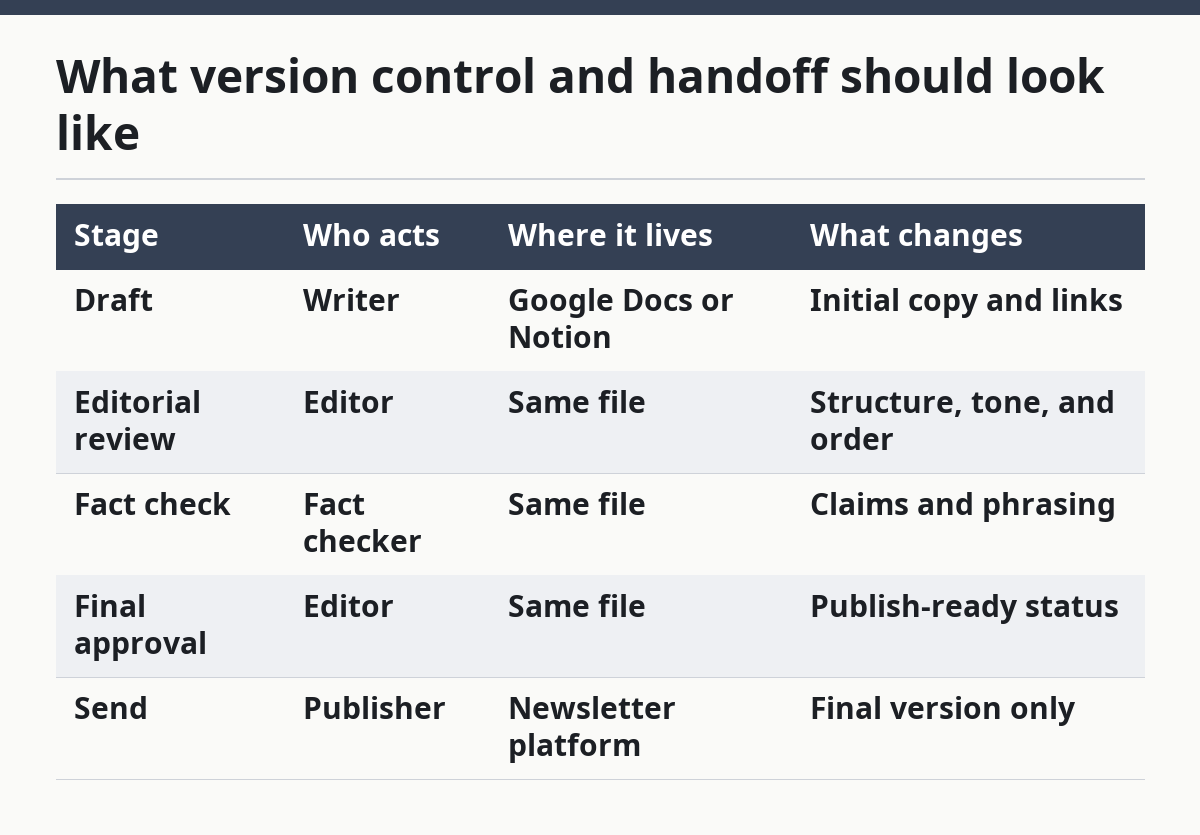
A clean handoff usually looks like this:
| Stage | Who acts | Where it lives | What changes |
|---|---|---|---|
| Draft | Writer | Google Docs or Notion | Initial copy and links |
| Editorial review | Editor | Same file | Structure, tone, and order |
| Fact check | Fact checker | Same file | Claims and phrasing |
| Final approval | Editor | Same file | Publish-ready status |
| Send | Publisher | Newsletter platform | Final version only |
If your team uses a newsletter platform with draft permissions, keep the approved copy there only after final signoff. That reduces the chance of someone pasting an earlier version into the send step.
The honest trade-off is speed versus control. A tighter handoff slows the first pass a little, but if contributors are involved, consult a professional about whether that trade-off fits your workflow. The same point applies in a newsletter team: tighter handoffs prevent last-minute corrections after the issue is already scheduled. That is the better trade if contributors are involved. It is the wrong fit only if your team publishes tiny issues with almost no edits.
What usually goes wrong in contributor approvals?
The approval process usually fails when the team confuses activity with progress. Lots of comments, Slack pings, and open tabs can still end in a draft that nobody has officially approved.
The most common mistakes are easy to spot:
- No named final approver. The issue gets reviewed, but nobody owns the yes or no.
- Mixed edits in email and docs. Changes disappear across channels.
- Fact check done too late. The draft is already polished, so fixes feel painful.
- Style guide ignored. Every contributor writes in a slightly different voice.
- Old versions stay in circulation. Someone sends the wrong draft because the file name did not make the winner obvious.
These mistakes cost time first. Then they cost trust. If readers see a wrong product claim or a sloppy correction pattern, the whole newsletter feels less careful.
A better setup uses the style guide as the first filter, not the last cleanup pass. It also keeps the final approval step separate from copy edits. Once a draft is approved, later changes should be rare and visible.
For a team that publishes weekly, a 15-minute review reset helps. Start each cycle by checking what worked in the last issue: where comments piled up, which review step stalled, and whether one person had to chase three others for signoff. That is the part most generic guides skip.
The approval process is not there to slow publication. It is there to make sure the newsletter that goes out is the one the team actually meant to send.
How does this connect to the rest of the newsletter system?
It connects by sitting between content planning and issue delivery. The approval process is the bridge from “we have a draft” to “this issue is ready to send,” which is why it belongs beside the editorial workflow, not inside the research process.
That is also why this page should sit under the larger guide on newsletter structure and editorial strategy. The bigger system covers how the newsletter is shaped; this part covers how the draft gets through the room without getting lost.
If the team already has a planning board, keep it separate from approval. Planning says what will be in the issue. Approval says whether the issue is ready to leave the dock. Those are different questions, and mixing them makes both slower.
A simple monthly check helps too. Once a month, look at one approved issue and ask whether the comments, signoff, and handoff were clean. If not, fix the step that failed, not the whole process at once.
How does newsletter approval work?
Newsletter approval works by moving one draft through a fixed review path before publication. The writer drafts, the editor reviews, the fact checker signs off on claims, and the final approver marks it ready. The process keeps changes in one file so the team can see what changed and who approved it.
How do editors review newsletter drafts?
Editors review newsletter drafts by checking the structure, voice, and editorial order before line edits start. They look for missing context, weak headlines, and sections that need cutting or moving. A good editor review usually happens in the same Google Doc or Notion page where the draft was written.
How do you manage feedback on newsletter issues?
You manage feedback on newsletter issues by keeping every comment tied to one decision and one owner. Use the draft file for changes, Slack for status, and email only for short reminders. That keeps the feedback trail in one place and makes final approval easier to track.
Drafted with AI; not yet reviewed by a person.
