
Last updated: November 20, 2026
Quick Answer: use 1 free tier and 1 paid tier. For How to Create a Paid Upgrade for a Free AI Tools Newsletter, make the premium offer narrow, obvious, and easy to compare from the free issue itself. A paid upgrade works best when the free newsletter still feels complete, while the premium tier adds bonus issues, a premium archive, exclusive tool lists, and a cleaner way to get past the noise.
Key takeaways
- Start with 1 paid tier, not 3.
- Sell a specific result, not “more content.”
- Put the upgrade link where a reader already pays attention.
- Keep the free newsletter useful so the paid layer feels like a next step, not a rescue.
- Build the premium archive and subscriber migration flow before you publish the pricing page.
What should the paid upgrade do?
The paid upgrade should save time for readers who already like the free newsletter and want faster access, deeper filters, or saved recommendations. In a free AI tools newsletter, the premium tier should not copy the free issue line for line. It should feel like a tighter shelf inside the same store.
That means the paid layer needs a job. It can collect the best tools from the month, add a premium archive, or send bonus issues focused on one use case such as writing, video, or search. If the free version gives readers the headline, the paid version should give them the shortlist and the back catalog.
This is where many newsletters go wrong. They build a paid tier that is just “the same thing, only longer.” That is hard to sell because the reader can already get the free version. A better plan is to make the premium tier easier to skim and easier to use than the free edition, even if it contains fewer items.
A simple membership platform can support this split without a complex setup. Stripe’s subscription docs and Patreon’s tier tools both show the basic model: 1 free level, 1 paid level, and a clear upgrade action. Stripe: https://stripe.com/docs/billing/subscriptions. Patreon tiers: https://support.patreon.com/hc/en-us/articles/360017478291-About-tiers-on-Patreon.
For a broader pricing structure, Stripe’s guide to subscription pricing is useful, and Patreon’s membership tiers page shows how paid access is usually framed.
How do you choose the premium tier?
Choose the premium tier by deciding what the paying reader gets in 3 minutes that the free reader does not. The answer should fit on one screen and one pricing page.
Start with 1 of 3 models: bonus issues, a premium archive, or exclusive tool lists. Bonus issues work well when the newsletter already has strong weekly sending habits. A premium archive works well when the value is in saved research and past picks. Exclusive tool lists work well when readers want curated directories instead of a stream of updates.
| Premium tier model | Best for | What the reader gets | Main risk |
|---|---|---|---|
| Bonus issues | Active senders | Extra issues with deeper picks or use-case breakdowns | Too much writing load |
| Premium archive | Research-heavy newsletters | Searchable past issues and saved tool lists | Archive feels stale if not updated |
| Exclusive tool lists | Fast-curation newsletters | Shortlists for specific tasks | Feels thin if the list never changes |
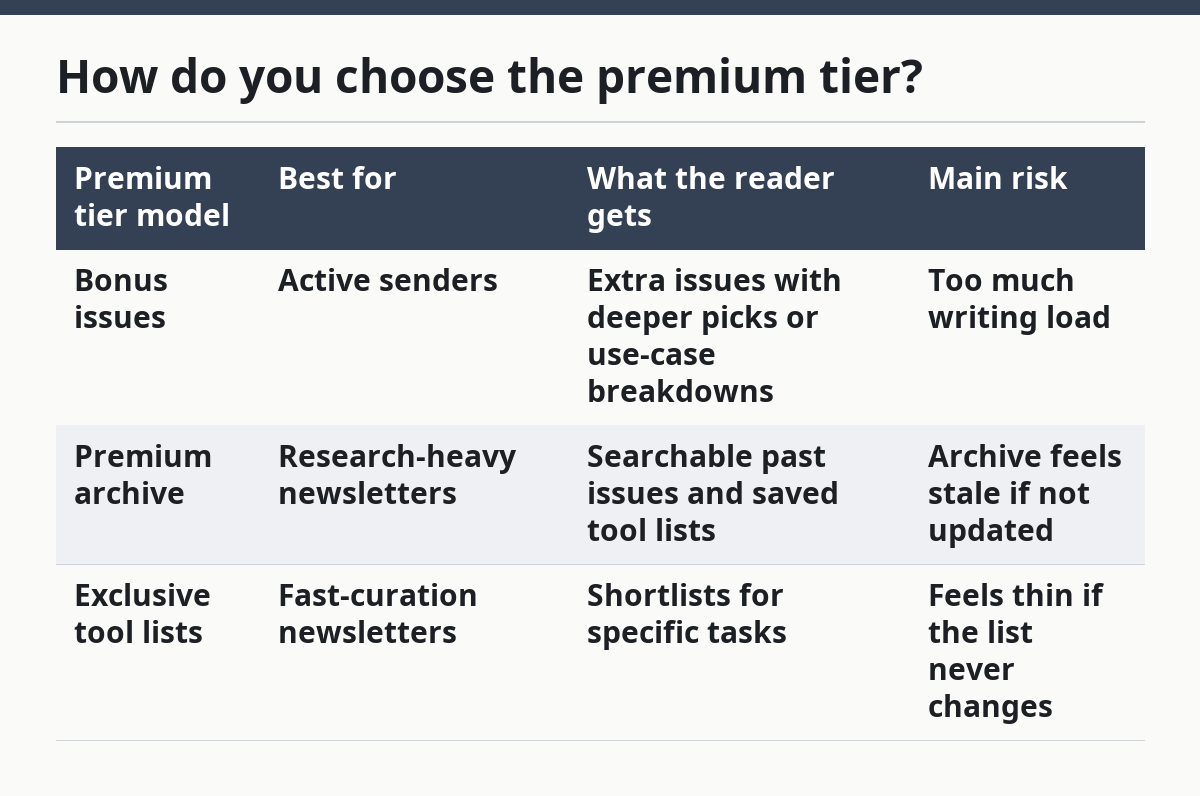
The wrong choice is the one that forces you to invent work every week. If your free newsletter already takes most of your time, a premium tier built around a fresh long essay can burn out fast. A premium archive and a subscriber upgrade flow are easier to maintain because they reuse material you already organized.
The right premium tier should also be narrow. A reader should know in one sentence what changes after they pay. “Get 2 bonus issues a month plus the full archive” is clearer than “support the newsletter and get more content.” Clarity helps the pricing page do its job.
What should go in the free issue?
The free issue should still solve a real problem, or the paid tier will feel like a wall, not an upgrade. A good free AI tools newsletter usually gives readers 1 solid tool pick, a short use case, and enough context to know whether to click.
That free layer does not need to be packed with everything. It needs to be trustworthy. If the free issue feels stripped down, readers will assume the paid version is also thin and they will not move. If the free issue is useful on its own, the paid tier can feel like a shortcut rather than a paywall.
Keep the free promise simple. One free issue can show the tool, the task it solves, and the next step. The premium tier can then add comparisons, the previous month’s archive, or 3 to 5 extra tool options. That split makes the value easy to see without making the free version useless.
This also keeps your subscriber migration cleaner. Readers already know what they get for free, so the upgrade pitch does not need to explain the whole newsletter again. It only needs to answer one question: what changes if I pay?
How do you set the subscriber upgrade path?
Set the subscriber upgrade path by making the upgrade button easy to find in 2 places: inside the newsletter and on the pricing page. A reader should not have to hunt for the paid tier.
The path usually works best in 5 steps:
- Define the premium tier in 1 sentence, such as “bonus issues plus premium archive access.”
- Choose a membership platform that can handle free and paid subscribers in the same list.
- Build the pricing page so it names the free plan, the premium tier, and the main difference between them.
- Place 1 upgrade link in the newsletter body and 1 near the sign-off.
- Move interested readers from free to paid with 1 click, not a separate form and a separate payment page.
The technical part should be boring. If the upgrade flow asks for too many clicks, the reader drops. If it asks for account creation before payment, more people leave. A clean subscriber upgrade path keeps the decision simple: read, compare, upgrade.
The pricing page matters here more than many newsletter owners expect. It is not a place to explain every feature. It is a place to answer 3 questions fast: what does the premium tier include, who is it for, and how do I join. If the page is vague, the free subscriber stays free.
For setup details, Stripe Billing and Patreon’s creator membership help are practical references for the upgrade path and payment flow.
What pricing page should you publish?
The pricing page should show 1 free tier and 1 paid tier, with the premium tier described in plain language. A pricing page that reads like a general brand page will not convert well.
Put the membership tiers side by side. Name the free newsletter, then name the premium tier with the exact extras attached to it. If the paid layer includes a premium archive, say so. If it includes bonus issues, say how often they arrive. If it includes exclusive tool lists, say what kind of lists they are.
Do not hide the difference behind vague words like “supporter” or “VIP” unless those words also tell the reader what they receive. A person should be able to compare the tiers in less than 30 seconds. That is the point of the page.
Here is the standard to aim for:
- Free tier: regular newsletter, basic tool picks, public archive if you keep one
- Premium tier: bonus issues, premium archive, exclusive tool lists, and subscriber upgrade access
That split is plain, but it works because it makes the value concrete. It also keeps the paid tier from competing with the free newsletter on the same terms. The free issue remains the entry point. The premium tier becomes the deeper lane.
When does this not work?
This does not work when the free newsletter has no clear audience or the premium tier has no clear extra. If the free version is already thin, a paid upgrade will feel like a tax. If the premium layer is just “more of the same,” readers may ignore it.
It also does not work if you try to sell too many membership tiers at once. Two or 3 plans can sound flexible, but they often blur the decision. One free tier and one premium tier are easier to understand and easier to manage.
A paid upgrade is a bad fit if your newsletter changes direction every week. Readers will not pay for a promise that keeps moving. Before you add the paid tier, settle the newsletter promise first: what kind of AI tools you cover, what kind of reader you serve, and what the premium archive is supposed to hold.
This is the trade-off. A paid tier can make the newsletter stronger, but it also raises the bar. You need a repeatable format, a clear premium archive, and a subscriber upgrade path that does not feel messy. If those pieces are not ready, keep the free version stable a little longer.
How do you keep the premium tier worth paying for?
Keep the premium tier worth paying for by updating it on a schedule and by making the archive easy to browse. A paid upgrade should feel maintained, not abandoned.
That means the premium tier needs at least 1 reliable cadence, such as a bonus issue slot or a monthly archive refresh. The exact timing matters less than the consistency. If readers pay once and then see no new value for several cycles, they will drift away.
The archive matters just as much as the new issue. A useful premium archive should not be a dump of old posts. It should feel like a search tool for past recommendations, grouped by use case or tool type. That makes the subscription feel useful even on weeks when the new issue is light.
The safer rule is simple: every paid month should add something a returning reader can find again. A bonus issue, a fresh shortlist, or a cleaned-up archive all do that. If the premium tier only works on the day it is sent, it is too fragile to hold attention.
Should a free newsletter offer a paid tier?
Yes, if the free newsletter already has a steady audience and a clear topic. A paid tier works best when the free version proves the topic has value and the premium layer gives the reader a sharper shortcut.
It is a poor fit if the free newsletter is still finding its voice. In that case, 1 strong free tier usually beats a rushed subscription model.
What content belongs in a paid upgrade?
A paid upgrade should hold the parts that save the reader more time than the free issue can. Bonus issues, a premium archive, and exclusive tool lists fit that job well.
The paid layer should not just repeat the free newsletter with extra words. It should add a clearer filter, deeper context, or access to past material that is hard to rebuild from scratch.
How do you move readers from free to paid?
Move readers from free to paid with a clear offer, repeated gently in the newsletter and on the pricing page. The upgrade path should be short, visible, and tied to 1 specific benefit.
A free reader is more likely to switch when the paid tier solves a next-step problem, such as sorting the archive or getting extra tool lists. The switch should feel like a better version of the same newsletter, not a separate product with a new promise.
Drafted with AI; not yet reviewed by a person.
