
Last updated: November 19, 2026
Key Takeaways
- Help readers find one issue, one tool, or one topic in under a minute.
- Put every past issue on one archive page.
- Keep tags short and based on words readers actually search for.
- Let readers search by title, tag, and full text, not only by subject line.
Your AI tools newsletter archive is hard to search when past issues sit in a long email dump. How to organize an AI tools newsletter archive so readers can search past issues starts with a clean archive page, tags, categories, and a search bar so readers can find old issues fast. The steps below show how to turn past issues into a reference library instead of a dead list.
What a searchable archive has to do for you
A searchable archive has to help someone find one issue, one tool, or one topic in under a minute. If it takes longer than that, the archive looks full but acts empty.
Picture this: you have 40 past issues, a half-finished archive page, and a search bar that only finds subject lines. A reader wants “image tools” from last spring, not a scavenger hunt. The fix is structure, not more writing.
A useful archive usually needs 4 parts: a page for all issues, tags for topics, categories for broad buckets, and a search bar that can scan titles and body text. If you only keep a chronological list, readers can see the past but can’t use it.
That matters even more for an AI tools newsletter, because one issue may cover prompts, video generators, coding helpers, and note apps. One flat list turns that mix into noise.
What the archive should let someone do
- Find a past issue by month, theme, or tool name
- Jump from one issue to all issues on the same topic
- Search by words in the issue body, not just the headline
- Scan a short index page instead of opening 20 emails
A useful archive behaves like a reference shelf. Not a mailbox.
Build the archive page first
The archive page should be the one place where every past issue is visible in one place. It needs a plain name, a short intro, and a list that works even if someone never touches the search bar.
Picture this: you land on the archive page from Google or from the newsletter footer. You want the latest issue, then the path to older ones. The page should answer both in one screen.
Start with a simple reverse-chronological list. Put the newest issue at the top, with the date, title, and a one-line summary. That summary should name the main tool or theme, not a vague teaser. A line like “AI meeting notes, image cleanup, and two prompt tools” tells the truth faster than “This week’s roundup.”
Then make each issue link to its own page or landing page. That gives search engines and human readers a stable target. It also lets you add tags and internal links without stuffing everything onto one page.
A basic archive page setup:
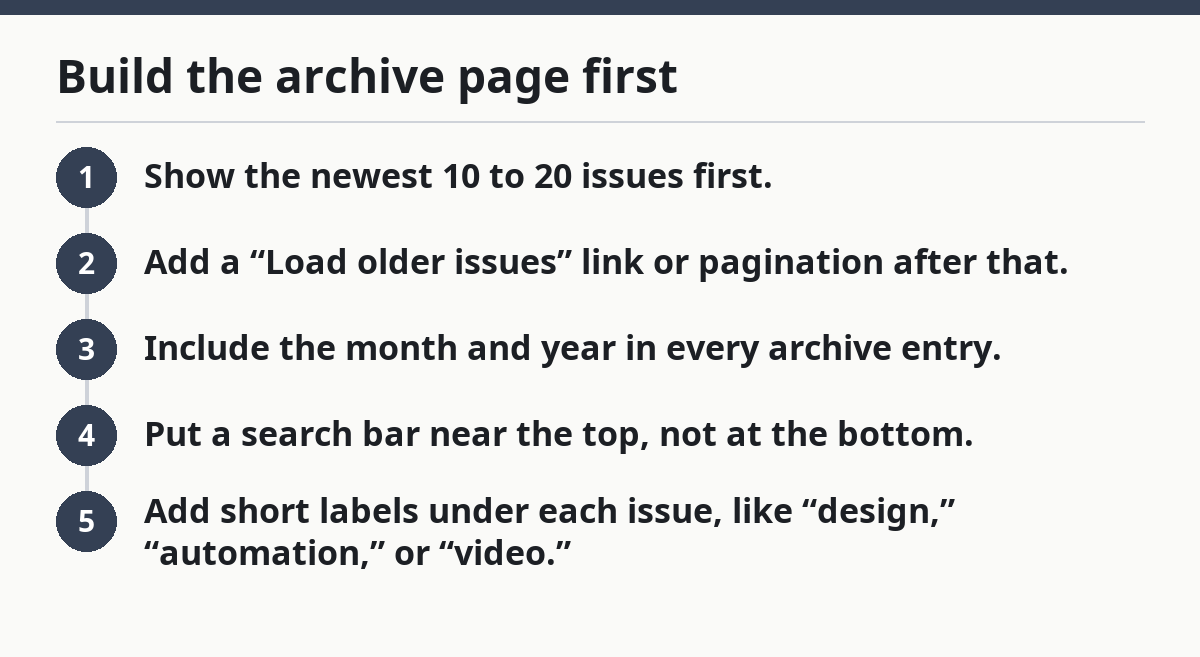
- Show the newest 10 to 20 issues first.
- Add a “Load older issues” link or pagination after that.
- Include the month and year in every archive entry.
- Put a search bar near the top, not at the bottom.
- Add short labels under each issue, like “design,” “automation,” or “video.”
If you publish weekly, a monthly grouping can help. If you publish less often, year-by-year sections may be enough. The point is to reduce scanning time. A person should not have to read 52 rows to find one tool.
How should I tag past issues?
Tag past issues with words readers would actually type, then keep the tag list short. A tag system works best when each issue has 3 to 5 tags, not 12.
Picture this: one issue covers AI image tools, another covers browser add-ons, and a third covers prompt workflows. Without tags, those issues look unrelated. With tags, the archive becomes a map.
Use three layers if your archive is growing:
- Categories for broad groups like productivity, writing, image, video, coding, and search
- Tags for specific topics like OCR, avatars, meeting notes, or summarizers
- Series labels for recurring formats like “Tool of the Week” or “Reader Picks”
Keep categories stable. Change tags more freely. If a tag appears only once, it may not deserve a permanent place. If a tag appears across many issues, it belongs in the system.
The biggest mistake is tagging by internal language. “Model update” or “vendor roundup” may make sense to the editor, but readers search for “chatbots,” “design,” or “calendar tools.” Use the words a person would type after work, not the words in your editorial meeting.
A good tag list also avoids near-duplicates. Pick one form and stick to it:
- “note-taking,” not both “notes” and “note app”
- “automation,” not both “workflow” and “automation”
- “image tools,” not both “graphics” and “images”
That consistency makes search cleaner. It also keeps your archive from bloating into 80 thin tags that nobody wants to browse.
Use categories for broad browsing, tags for precision
Categories should answer the question “What kind of issue is this?” while tags answer “What exactly is in it?” That split keeps the archive useful at both the top level and the search level.
Picture this: a new subscriber wants every issue about AI writing tools. A returning reader wants one issue about AI avatars from six months ago. Categories help the first person; tags help the second.
A category list of 5 to 8 items is usually enough for a newsletter archive. More than that, and browsing gets noisy. Each category should cover a stable editorial lane, such as:
- Writing
- Design
- Video
- Productivity
- Automation
- Coding
- Research
Inside each category, use tags for specifics. A writing issue might carry tags like “headlines,” “summaries,” and “email copy.” A video issue might carry “avatars,” “editing,” and “subtitles.”
The mistake to avoid is using categories as a dumping ground. If every topic gets its own category, the archive becomes harder to scan than the inbox it replaced. A category should gather issues, not split them apart.
If your newsletter mixes news and tools, separate those too. A reader looking for tool reviews should not have to sift through product announcements. A simple label like “news” or “release watch” can keep those issues from crowding the main path.
The structure to aim for is:
- Categories = the shelf
- Tags = the label on the book
- Search = the flashlight
That’s the whole game.
How do readers search past issues?
Readers should be able to search past issues by title, tag, and full text, not just by exact subject line. If the search bar only checks headlines, it fails the first time someone remembers a tool but not the issue title.
Picture this: someone remembers that you covered “transcription tools” in an issue from March. They do not know the title. They should still find it in 2 or 3 clicks, not by guessing.
Your search setup should cover three paths:
- Search the archive page
- Search issue titles
- Search issue body text
That third path matters most. A useful AI tools newsletter often mentions tools in the body that never make it into the title. If the search bar ignores body text, half the archive is hidden.
Add filters if your platform supports them. Good filters let readers narrow by:
- date range
- category
- tag
- issue type, such as roundup or deep dive
If you use a hosted newsletter tool, check what its archive search can actually do. Some systems search only page titles. Others index the full page. A simple test helps: search for a tool name that appears in the body but not in the headline. If it does not appear, the archive needs a better search layer.
On the flip side, do not overload the archive with too many filters. Eight filters look powerful and feel clumsy. A few strong ones beat a long control panel.
A helpful search bar should also surface:
- related tags
- recent issues
- matching categories
That gives readers a second path when their first search is fuzzy.
A simple workflow for back issues
The cleanest archive workflow is to tag and index every issue at publication, not months later. That keeps the archive from turning into a backlog project that nobody wants to open.
Picture this: you publish on Friday, then spend Monday trying to remember what each issue covered. That version fails fast. A 10-minute archive step at publish time saves hours later.
Use this workflow for each new issue:
- Write the issue title with the main topic in plain language.
- Add 3 to 5 tags before you send it.
- Assign 1 category that matches the main topic.
- Write a one-line summary for the archive page.
- Link the issue from the archive page and any relevant index pages.
- Check search by looking up one tool name from the issue body.
- Review old tags once a month and merge duplicates.
That last step matters. An archive rots when tags drift. If one issue says “AI art” and another says “image generation,” readers may miss a connection that should be obvious.
A monthly cleanup does not need to be long. Fifteen minutes is enough for a small archive. The goal is to keep the taxonomy stable, not perfect.
Also add index pages when a topic keeps coming back. If you have six issues about writing tools, build a “Writing tools” index page that lists those issues in one place. That page becomes a shortcut for readers and a signal for search.
This is the part many generic guides skip: an archive is not just storage. It is a wayfinding system. If it does not help someone move from one issue to the next, it is just a folder.
Common archive mistakes that make past issues hard to find
A common archive mistake is treating every issue as a one-off. That creates a wall of links with no route through it, and a wall is not a library.
Picture this: your archive page has 100 issues, all titled with clever phrases. A reader wants one on prompt tools. They scan, click, back out, and leave. The archive failed because it hid meaning behind style.
Here are the most common errors:
- Cute titles with no keywords — readers cannot guess what the issue contains
- Too many tags — the archive looks detailed but feels random
- Duplicate tags — “video” and “videos” split the same topic
- No index pages — repeated topics never get a home
- Search limited to titles — the body text stays invisible
Each one has a cost. Cute titles hurt findability. Tag clutter hurts browsing. Duplicate labels hurt trust. A title that is clever once can cost you every time someone returns.
The fix is plain language. Name the tool, the topic, or the use case in the title when it matters. Use broad categories, then add narrow tags. Keep the archive page readable on a phone. A lot of newsletter readers will hit it from mobile, and a cramped list is hard to scan on a 6-inch screen.
Related issues should link to each other when that helps readers move from one topic to another. If issue A covers AI writing tools and issue B covers editing tools, cross-link them. That gives readers a second door and keeps older issues alive.
A newsletter archive readers can actually use
A useful archive is the one that lets someone find old issues without guessing. That means a clean archive page, a short list of categories, consistent tags, a working search bar, and index pages for repeat topics.
Picture this: a reader comes back three months later with a specific problem. They find the issue in seconds, then open two older ones that match. That is what a newsletter archive is for.
The real test is simple: can a stranger search the archive by topic, tool name, or month and land on the right issue? If yes, the structure works. If no, the archive is still just a stack of emails.
For a broader plan on the newsletter itself, the guide to Free AI tools newsletter — The Complete Guide can sit above this page as the hub. This page’s job is narrower: make the archive searchable and useful.
Should newsletters have an archive?
Yes, newsletters should have an archive if past issues still matter after the send date. An archive turns old email into a reference page, which helps both new subscribers and returning ones. If your issues cover tools, tutorials, or recurring topics, an archive earns its place fast.
How do readers find old issues?
Readers find old issues fastest through a search bar, tags, and a plain archive page with dates and summaries. Full-text search is best because people often remember a tool name, not the issue title. If search is weak, categories and index pages become the backup route.
Drafted with AI; not yet reviewed by a person.
