
Last updated: November 19, 2026
Key Takeaways
- A 4-week or 8-week editorial calendar turns a loose list into clear themes, deadlines, and review time.
- Start with issue dates, then assign themes, then fill in tools and deadlines.
- A structured calendar can move from topics to deadlines without missing steps.
- Rotate theme, tool category, and format to keep the newsletter fresh and on voice.
An AI tools newsletter editorial calendar keeps each issue on theme, on time, and hard to repeat by accident. Quick answer: use a theme-first content calendar with fixed deadlines, rotating tool categories, and a simple workflow. The steps below settle how far ahead to plan, what gets scheduled first, and how to keep the issue mix from going stale. For workflow basics, see the content calendar guide and the newsletter planning template.
What an editorial calendar has to do for an AI tools newsletter

Picture this: you’re staring at next month’s issues, three drafts are half-written, and every topic sounds like the last one with a different tool name. An editorial calendar fixes that by turning a loose list into a 4-week or 8-week plan with clear slots for themes, deadlines, and review time.
The job is not to fill boxes. It is to keep the newsletter from drifting into random tool links and repeated coverage. A good calendar shows what each issue is for, who owns it, and when it has to be ready.
That matters more for AI tools than for many other newsletter types. Tool news moves fast, but the structure still needs to stay steady. If one week is about writing assistants, the next can’t just be “another writing assistant.”
A useful calendar usually tracks these items:
- Issue date
- Main theme
- Tool category
- Draft deadline
- Edit deadline
- Send date
- Backup topic
The calendar can live in Notion, Airtable, Asana, Trello, or a plain spreadsheet. The tool matters less than the habit. A messy Google Sheet is better than a fancy board no one updates.
The truth is, the calendar is a decision record. It shows why one topic got picked and another got pushed. That saves time when you need to explain the issue plan to a newsletter editor, a writer, or a client. For related workflow setup, the newsletter editorial workflow keeps approvals and handoffs in one place.
How do you plan an AI tools newsletter editorial calendar?
You plan it by starting with the issue dates, then assigning themes, then filling in tools and deadlines in that order. That sequence keeps the calendar from becoming a pile of random posts.
Start with the send cadence first. If the newsletter goes out every Tuesday, put every Tuesday on the calendar for the next 4 to 12 weeks. Then assign a single theme to each issue. Only after that should you pick tools, angles, and supporting notes.
Here’s the catch: if you pick tools first, you usually end up with repeats. If you pick themes first, you can spread coverage across different use cases such as writing, research, automation, image generation, or meeting notes.
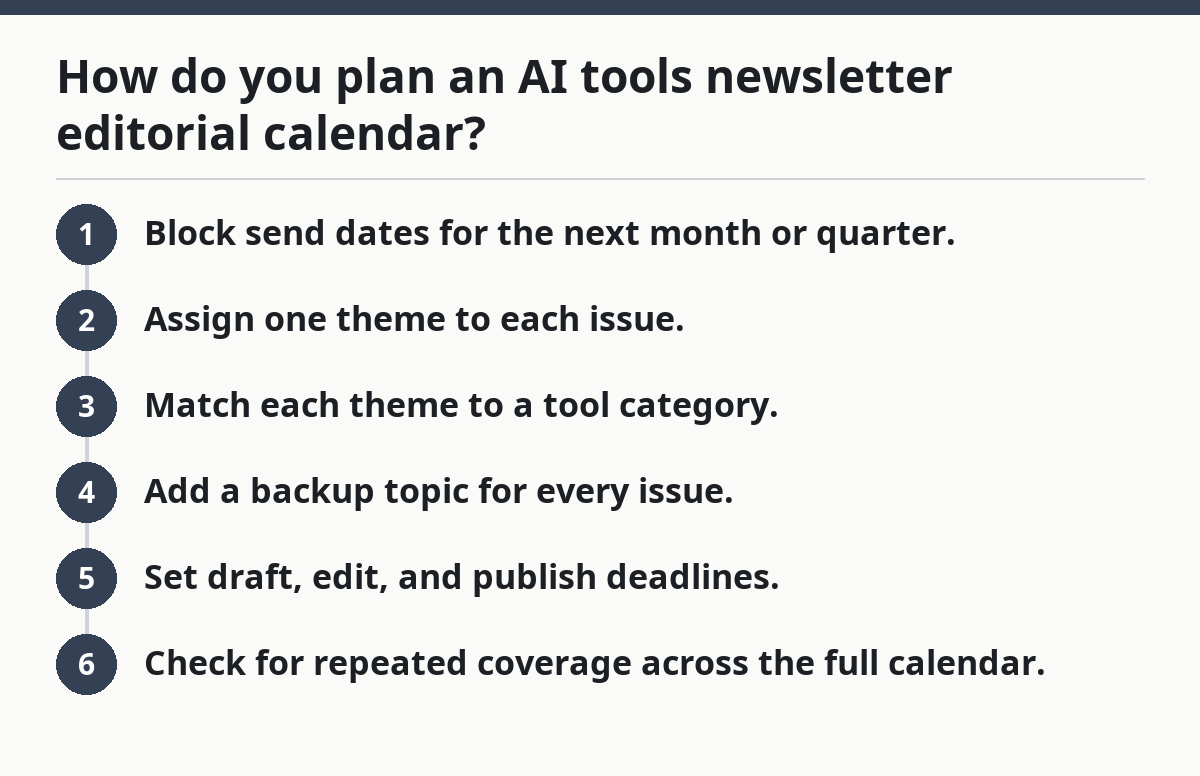
A practical planning order looks like this:
- Block send dates for the next month or quarter.
- Assign one theme to each issue.
- Match each theme to a tool category.
- Add a backup topic for every issue.
- Set draft, edit, and publish deadlines.
- Check for repeated coverage across the full calendar.
The result should be a calendar that tells a story across several issues, not just one. One issue might focus on new workflow tools, the next on time savers for creators, the next on tools that help with team work. That rotation gives the newsletter some shape.
Keep one rule in mind: the calendar should be short enough to adjust. A full 90-day plan is fine if the market is calm, but AI tools change fast. If your calendar is too rigid, you will spend your time repairing it. For a broader publishing setup, the newsletter strategy guide explains how cadence and audience fit together.
The planning steps I use for a working content calendar
Picture this: you have a spreadsheet open and you need to turn a blank month into a usable plan by noon. The fastest approach is to move from structure to topic choice to deadline control, not the other way around.
A working content calendar for an AI tools newsletter usually follows the same sequence every time. It can prevent missed steps and make each issue easier to hand off, though a professional editor should still review the final plan. See Nieman Lab for newsroom workflow examples and planning methods.
- List the send dates. Put the next 4 to 8 issues in the calendar so the run of topics is visible.
- Choose the theme for each issue. Use broad buckets like writing, research, automation, chat assistants, design, or ops.
- Assign a content angle. Decide whether the issue is a roundup, a single-tool spotlight, a comparison, or a use-case issue.
- Add tool categories. Label each issue by function, not just by product name, so the mix stays balanced.
- Set deadlines backward. If the send date is Friday, make the draft due 3 to 5 days before that, the edit due 1 to 2 days before, and the final check on send day.
- Mark backup pieces. Keep one backup topic per month in case a tool changes, breaks, or becomes stale.
- Review overlap. Scan the next 30 days for duplicated tool types, repeated claims, or too many “best of” issues in a row.
This process can work even when the team is small. A solo newsletter editor can use the same steps in a spreadsheet or a task board without building a complex system.
Do not skip the backup topic. When a tool shuts off a feature or changes pricing, that backup keeps the issue from sliding. For product changes and launch timing, the product update checklist helps editors track moving parts.
What should be rotated so the newsletter does not feel repetitive?
You rotate theme, tool category, and format so the newsletter feels fresh without losing its voice. Repetition is usually a planning problem, not a writing problem.
If every issue is another list of chat assistants, the audience stops seeing a reason to open the email. The fix is to rotate by use case and by job-to-be-done. One week can focus on drafting. Another can focus on research. Another can focus on visual work or admin tasks.
A simple rotation model helps:
- Week 1: broad category intro
- Week 2: one narrow use case
- Week 3: comparison or workflow angle
- Week 4: tool category for a different audience segment
That structure gives you room to cover a wide range of tools without sounding random. It also helps a newsletter editor avoid the trap of over-serving one audience and ignoring everyone else.
You can also rotate by experience level. One issue can help beginners, while the next serves power users who already know the basic names. That split keeps the content useful without forcing the same explanation every time.
The standard mistake is to rotate only product type and ignore audience need. A calendar full of “new AI tools” can still feel flat if every issue serves the same exact task. A better calendar mixes categories with angles such as speed, quality, collaboration, and cost.
If you want one guiding rule, use this: no two adjacent issues should solve the same problem in the same way. That is what keeps the archive worth browsing later.
How do deadline planning and workflow keep the calendar usable?
Picture this: the calendar looks good on Monday, then Thursday arrives and nothing is ready for edits. Deadline planning keeps the issue alive by giving every step a date, an owner, and a buffer.
A simple workflow beats a fancy one. Most teams need only five stages: plan, source, draft, edit, approve, send. If a stage has no date, it tends to expand and swallow the next one.
Use a deadline chain like this:
- Topic locked: 2 to 4 weeks before send
- Draft due: 3 to 5 days before send
- Edit due: 1 to 2 days before send
- Final approval: same day or the day before
- Archive note: after send
That sequence gives the newsletter editor enough room to react if a tool changes. It also helps if someone else needs to step in. A clear workflow means the issue does not depend on one person remembering everything.
The truth is, most calendar failures happen at handoff points. A topic gets approved, but no one records the draft date. Or the draft exists, but nobody reserved time for a final check. The calendar should show every handoff in the same place.
A good workflow also separates “plan” from “publish.” Planning a month ahead is fine, but writing too early can backfire if the AI tool market shifts. For that reason, many editors keep the theme fixed and the angle flexible until the draft stage.
The best calendars include a note field for risks: beta product, pricing change, public launch, or feature still unstable. That note tells the editor when a topic needs review before it goes out, and a professional editor should verify it before publication. See the FTC business guidance for general publishing and disclosure considerations.
What a beginner usually gets wrong
Picture this: you have a tidy calendar with 12 issue slots, but the next month still feels unbalanced and repetitive. That usually means the plan has topics, but not enough structure around them.
The most common mistake is scheduling by tool name only. That makes the calendar look busy while the content feels thin. A better plan pairs every tool with a use case and a reason it belongs in that issue.
Another mistake is building a calendar without a spare topic. That costs time when a story goes stale or a tool disappears. A backup topic is not a luxury; it is part of the workflow.
A third mistake is packing too many “fresh” items into one month. That sounds good until every issue needs new research, new screenshots, and a new angle. The calendar gets harder to maintain than it should be.
Watch for these traps:
- Too many issues about the same tool category
- No buffer between draft and send
- No backup topic
- No note on why a theme was chosen
- No review of the last 30 days of coverage
Here’s the catch: the cleanest calendar often feels boring on paper. That is a good sign. The point is not to surprise yourself every week. The point is to make the work repeatable without making the newsletter repetitive.
If the plan keeps collapsing, shrink the horizon. A 4-week calendar is often easier to manage than a 12-week one. Shorter plans give you more room to adapt without losing the thread.
For the larger structure behind this, the hub guide to Free AI tools newsletter — The Complete Guide gives the broader newsletter frame this page plugs into.
What does a good finished calendar actually look like?
Picture this: you open the calendar and can tell, in under a minute, what each issue is about, when it moves, and how it avoids overlap. That is what “done” looks like for an editorial calendar.
A finished calendar should include enough detail that a second person can pick it up without guessing. It does not need every headline written out. It does need the issue date, theme, category, deadline trail, and a note on any backup plan.
A clean calendar often has these columns:
- Send date
- Main theme
- Tool category
- Angle or format
- Draft deadline
- Edit deadline
- Backup topic
- Status
The strongest version of this workflow is simple enough to keep updated weekly. If the calendar needs a long meeting to explain, it is probably too dense. If it has no deadlines, it is not a workflow; it is a wish list.
One useful standard is to review the calendar every Friday or every Monday morning. That short review can keep the issue plan current and help prevent drift, though a professional editor should still make the final call. It also gives the newsletter editor one place to catch repeats before they go live. For workflow cadence, the editorial calendar template shows a simple weekly review setup.
A good editorial calendar should answer three questions at a glance: What is the issue about? When is it due? Why does it belong here and not next week? If the calendar cannot answer those, it needs more work.
FAQ
How far ahead should an editorial calendar be planned?
A 4-week to 12-week range is the most practical place to start. Shorter plans are easier to change when tools shift fast, while longer plans help if the newsletter runs on a steady pattern. The right horizon depends on how often the market changes and how many people touch the workflow.
What should be scheduled first in a newsletter calendar?
The send dates should be scheduled first, then the themes, then the deadlines. That order keeps the calendar tied to the real publication rhythm instead of random topic ideas. Once the dates are set, the rest of the workflow becomes much easier to line up.
Drafted with AI; not yet reviewed by a person.
