
Last updated: November 19, 2026
Quick answer: free AI tools are enough for many people, and paid AI tools are worth it when the limits start costing time, accuracy, or access to the features you actually need. In this free vs paid AI tools guide, use the free tier until feature limits get in the way; pay only when a trial plan or upgrade opens a clear workflow win.
A newsletter that covers both free and paid AI tools helps with the part most people skip: deciding when a free plan is a smart default and when a paid plan is the cheaper move in disguise. I write for that decision, not for hype, and the question here is simple: what should a subscriber choose when the issue is feature limits, not brand loyalty?
Key Takeaways
- Free AI tools are usually best for light, occasional use, especially when the job is small and the prompts are simple.
- Paid AI tools make sense when you need higher usage caps, stronger file handling, team features, or a more stable workflow.
- Trial plans are the cleanest way to test whether an upgrade removes a real bottleneck before you commit.
- The right choice depends less on “AI quality” in the abstract and more on how often you hit limits, how much context you need, and whether the tool must fit into daily work.
- If the newsletter surfaces both free and paid options, its real value is helping you avoid paying for features you will not use.
What the newsletter is really helping you decide
The newsletter helps you choose between free AI tools and paid AI tools by sorting features into two buckets: nice-to-have and workflow-critical. That matters because many free plans are generous enough for learning, drafting, and occasional tasks, while paid plans usually earn their keep through access limits, longer context windows, file uploads, team controls, or faster response when demand is high.
That is the real decision: not “Is paid better?” but “Does paying remove a specific bottleneck?” A free plan can be the right answer for a student drafting emails, a solo creator brainstorming headlines, or a homeowner asking one-off questions. A paid plan starts to look rational when the tool becomes part of a repeatable process and the free version interrupts that process with caps, lockouts, or shallow output.
A good newsletter also keeps you from making the usual mistake: upgrading because a feature sounds advanced, not because you need it. A practical decision rule is the safest one here. If a free tier gives you enough turns, enough file support, and enough quality for the task, it wins. If you keep working around limits, the subscription is probably buying time, not just convenience. For broader curation of that kind, the free ai tools newsletter hub is the right place to anchor your search.
The real difference between free and paid AI tools
Free AI tools win on access. Paid AI tools win on reliability, limits, and control. That sounds obvious, but it changes the buying choice in a concrete way: free plans are designed to let you start, while paid plans are designed to let you keep going without hitting the brakes.
The biggest difference is usually not the model name on the box. It is the ceiling. Free plans often restrict message volume, file uploads, image generation, access to newer models, or advanced features like memory, projects, custom instructions, or collaboration. Paid plans usually raise those caps and add something the free tier withholds. That “something” is often what turns an AI tool from a curiosity into a work tool.
Another difference is consistency. Paid tools are often built for people who need repeatable output across a week, not just a useful answer today. That can matter for writers, marketers, support teams, and analysts who need the same interface, the same permissions, and fewer surprise slowdowns. Free plans are more variable by design because they are meant to be entry points.
There is one more split that people miss: trial plans are not the same as free plans. A trial can show you the paid feature set for a short window, while a free plan is the long-term baseline. The newsletter’s job is to tell you which one is useful for your decision. If you only need a one-time comparison, a trial plan is enough. If you need a daily companion, the limits on the free plan matter more than the headline feature list.
Free AI tools: who should actually use them?
Free AI tools are the right choice for beginners, casual users, and anyone whose AI work is irregular. If you ask a tool for help a few times a week, the free tier is often enough to learn the interface, test prompt habits, and decide whether AI is even part of your routine. That is the strongest case for free: low commitment, low risk, and no pressure to extract full value from a subscription.
Free plans also work well when the task is narrow. Drafting short emails, rewriting a paragraph, summarizing a public document, generating ideas, or cleaning up rough notes usually does not require the premium tier. If the result only needs to be “good enough” and not polished to a production standard, free tools are often the sensible default.
The weakness is just as clear. Free AI tools are poor fits when your work depends on volume, long context, or file-heavy workflows. Once you start juggling multiple documents, asking follow-up questions inside one long conversation, or needing a higher number of outputs per session, free limits become a drag. The consequence is broken flow. You spend time waiting, splitting tasks, or switching tools.
That is why free tools are wrong for people who need predictability. If you rely on AI every workday, if you need collaboration features, or if you treat the tool like part of a client workflow, the free tier is often a false economy; for regulated or high-stakes use, consult a professional and review authoritative guidance such as the UK Information Commissioner’s Office on AI and data protection. A plan with a 0-cost entry point can still cost more in lost time when the cap shows up in the middle of work. For beginners, though, free is usually the smartest first move because it teaches the workflow before money enters the picture.
Paid AI tools: the specific situations where they win
Paid AI tools win when the tool has become part of the job, not a side experiment. That is the cleanest threshold. If you use AI daily, if you work with large files, if you need longer chat memory, or if the free plan keeps cutting you off at the wrong moment, paid is the better fit because it buys continuity.
The other clear win is for people who care about deeper features rather than just a chat box. Paid plans often open higher-quality models, better file handling, multimodal features, custom project spaces, or admin controls for teams. Those features matter because they reduce friction in real work. A designer who needs image generation, a consultant who works through documents, or a manager who needs shared access is not shopping for novelty; they are shopping for fewer steps.
Paid tools are also better when the output must be dependable enough to review, revise, and send quickly. In that setting, the value is not “better AI” in the abstract. The value is fewer interruptions, fewer resets, and fewer reasons to start over. A subscription can make sense even if the model quality seems close on paper, because the unpaid version may be artificially constrained.
The drawback is equally real. Paid plans are wasteful for light users, and subscriptions can become a quiet drain when the feature list is broader than the actual need. A team plan can be especially easy to overbuy if only one person uses it. The wrong paid tool adds complexity: billing, account management, and the pressure to justify the spend. That is why paid AI tools are not for everyone. They are for people who have a repeatable use case and can name the bottleneck the upgrade removes.
The honest side-by-side
Free AI tools are the better choice when you are still exploring. Paid AI tools are the better choice when the tool is already in your routine. That difference shows up in the criteria that actually matter.
| Criteria | Free AI tools | Paid AI tools | Winner for [condition] |
|---|---|---|---|
| Upfront commitment | $0 entry, usually easy to try | Subscription or paid access, depending on plan | Free, if you are still learning |
| Usage limits | Lower caps on messages or tasks | Higher caps and fewer interruptions | Paid, for daily users |
| File handling | Often restricted or basic | Usually broader file support | Paid, for document-heavy work |
| Model access | Often older or limited models | More likely to include newer models | Paid, for quality-sensitive tasks |
| Collaboration | Usually limited | More likely to support teams | Paid, for shared workflows |
| Learning curve | Good for low-risk experimentation | Better once your process is established | Free, for beginners |
| Trial option | May be absent or limited | Common as a short-term test | Paid, if you need to compare features |
| Workflow stability | Fine for occasional use | Better for repeat work | Paid, when interruptions hurt |
| Value per dollar | Strong if usage is light | Strong if the tool replaces manual work | Depends on task frequency |
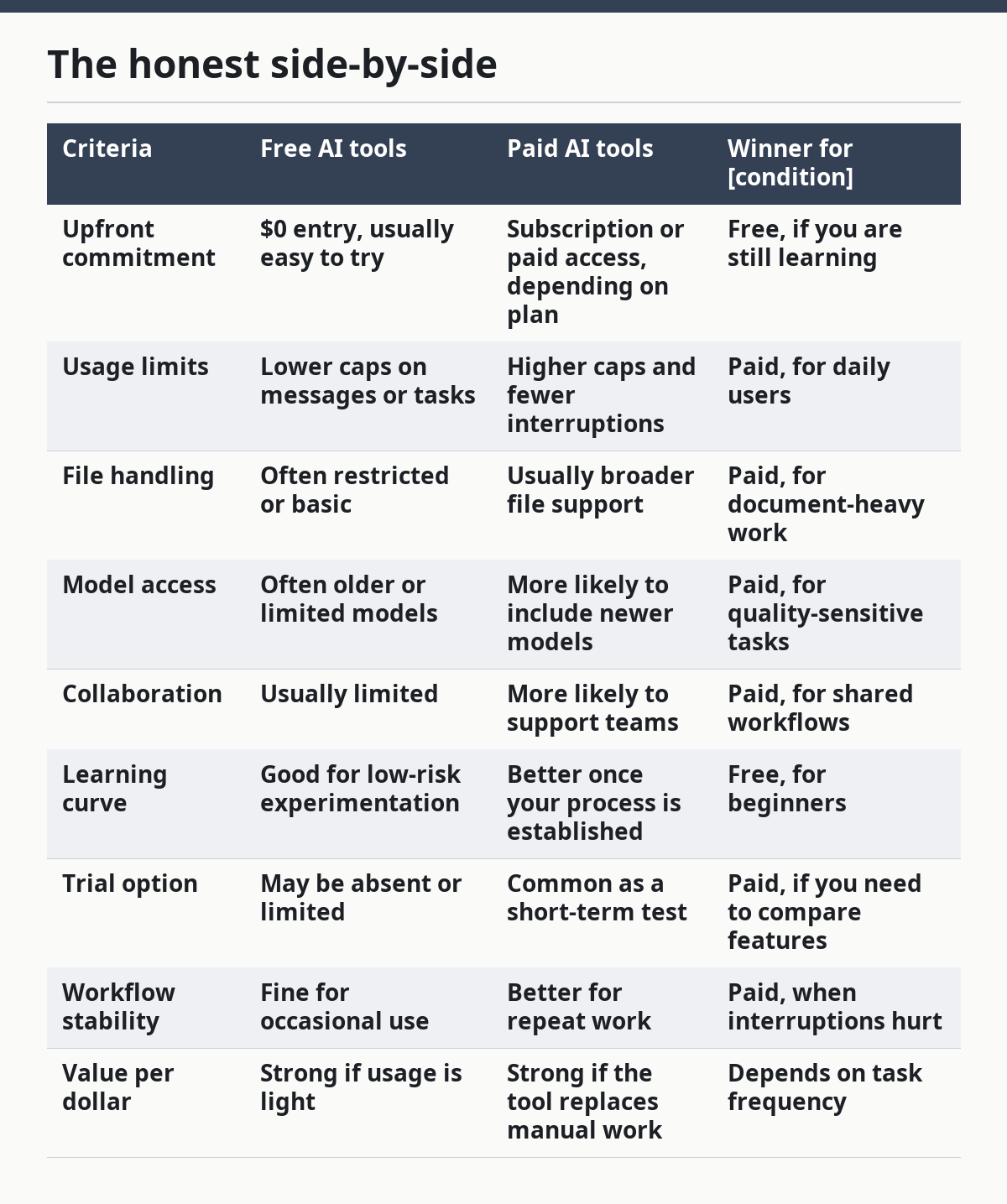
The table does not say paid is “better.” It says paid is better when specific constraints matter. That is the point the newsletter should help a subscriber see quickly. A tool with more features is not automatically a better purchase if those features sit unused. A free tool with a ceiling is not a problem if you never hit the ceiling. The correct choice is the one that fits the way you actually work, not the way the marketing page imagines you work.
For purchase-style decisions, I would also insist on looking for a trial plan before paying. A trial can expose whether the paid tier really fixes the issue you have, or whether the problem is your process, not the plan. Authoritative comparisons from organizations like the Federal Trade Commission on deceptive claims can also help you separate marketing from substance before you buy.
When should you stop using free AI tools?
You should stop using free AI tools the moment the limits start changing your behavior. That is the clean test. If you begin trimming prompts, splitting tasks across tools, copying and pasting around caps, or avoiding the AI because it is inconvenient, the free plan has stopped being free in any meaningful sense.
This is where feature limits matter more than headline features. A free plan can look generous on paper and still fail in practice if it cuts you off during a long session, blocks the file type you need, or keeps advanced features behind a paywall. A newsletter that compares free and paid options is useful because it points out those blockers before you commit time to a tool you will outgrow in a week.
The clearest upgrade triggers are easy to spot: daily use, repeated caps, collaboration needs, larger documents, and a need for consistent output. If any one of those is true, paid tools deserve a serious look. If none of them is true, free is still the right answer.
There is also a point where neither option is the right answer. If you need guaranteed accuracy, regulated handling of sensitive information, or a tool for a formal business process with strict compliance requirements, a consumer-style AI plan may not be enough at all. That is not an argument against AI tools. It is a reminder that some problems need specialized software, human review, or a policy-approved workflow instead of a general-purpose chatbot.
For context on data handling and digital services, the UK Information Commissioner’s Office has guidance on AI and data protection, and the U.S. Federal Trade Commission publishes consumer-facing advice on deceptive claims and online products. Those are the kinds of sources worth checking before a team standardizes on any AI tool.
The verdict: which one to choose and why
Choose free AI tools if you are a beginner, an occasional user, or someone whose tasks are short, simple, and tolerant of limits. Choose paid AI tools if you use AI every day, need stronger file support, or keep running into caps that slow real work. Neither if your use case needs strict compliance, sensitive-data controls, or a specialized system that a general AI tool cannot provide.
That is the clean recommendation. Free is the right default for most first-time users because it teaches the workflow without forcing a subscription. Paid is the right move when the tool has become part of your process and the limits are costing time or quality. The newsletter helps because it does not just list options; it shows where the free tier ends and where the paid tier actually starts to matter.
Exception scenarios where the choice flips
A free plan can still be the wrong choice if the trial plan is the only way to test a feature you need. In that case, a short paid trial is the better move because it shows whether the upgrade solves the problem before you commit. That matters most when the feature is hard to judge from a marketing page, such as longer context handling or file workflows.
A paid plan can also be the wrong choice for a team that only needs AI a few times a month. If usage is sporadic, the subscription cost is wasted attention as much as money. The team would be better served by a free plan and a shared prompt process than by paying for unused seats.
The verdict flips again when the job is educational rather than operational. If the goal is to learn prompting, compare models, or experiment with use cases, free tools are the better classroom. Paid access can distract from the learning phase by making every feature feel necessary.
Finally, if the newsletter highlights multiple tools and you only need one narrow function, the right answer may be to stay free and ignore the rest. Tool fatigue is real. A narrow, free workflow beats a paid subscription you keep because it looks advanced on paper.
Are free AI tools enough for most users?
Yes, for many casual users, free AI tools are enough. They usually cover light drafting, brainstorming, summaries, and basic question answering without forcing a subscription. The limit appears when usage becomes routine, documents get longer, or the free tier starts interrupting the work.
When should I pay for an AI tool?
Pay when the free version begins getting in your way. If you hit usage caps often, need better file support, want team access, or rely on the tool every workday, a paid plan is easier to justify. A trial plan is useful when you want proof that the upgrade removes a real bottleneck.
What are the limits of free AI tools?
Free AI tools usually come with lower message caps, fewer advanced features, and weaker support for file-heavy or long-context work. They are fine for short tasks, but they can slow you down once you need consistent output or repeated sessions. The key limit is not just quality; it is how often the plan stops you.
Drafted with AI; not yet reviewed by a person.
