
Last updated: November 20, 2026
Build a fact-checking workflow for AI tool mentions by checking the product page, pricing page, documentation, and release notes before you publish. That workflow keeps newsletter mentions current, catches broken claims fast, and gives you a source trail you can trust later.
Key takeaways
- Check the claim, not the hype. A tool mention should match the vendor’s own docs, pricing page, and changelog.
- Split the work into small checks: feature, price, access, version, and source note.
- Treat “free,” “available,” and “works” as separate claims. They often change on different pages.
- Save the exact page, date, and line that supports each claim so you can re-check it later.
- Use a repeatable order every time. A fixed workflow is faster than re-reading from the top.
What should a fact-checking workflow cover?
A fact-checking workflow for AI tool mentions should cover five claims: what the tool does, what it costs, who can use it, what version is current, and whether the source still says the same thing. That is the core of the job, and it is enough for most newsletter mentions.
Start with the vendor’s own material. For software, the most reliable first stops are the tool documentation, pricing page, release notes, and product changelog. Those pages usually answer different questions, and the gap between them is where bad mentions slip through.
Do not treat one page as enough. A pricing page can say one thing about access while the docs say another about limits or supported features. A changelog can show that a feature shipped in one version but later changed in a newer one. If the mention uses a date, plan name, model name, or feature label, that detail should appear in your notes exactly as written on the source page.
A strong workflow also decides what not to do. It should not try to prove a tool is “good,” “best,” or “worth it.” That is a separate editorial question. This page is about whether the mention is accurate enough to publish, not whether the tool deserves a slot in the newsletter.
How do you check an AI tool mention step by step?
You check an AI tool mention by moving from claim to source in the same order every time: feature, price, access, version, and notes. That order keeps you from skipping the boring details that cause the worst corrections later.
-
Open the tool documentation and match the feature claim.
Read the doc page for the exact feature named in the draft, then confirm the wording, the model name, or the supported action on the page itself. If the draft says the tool “transcribes audio,” the docs should say that plainly, not just imply it. -
Open the pricing page and check the cost claim.
Compare the draft’s price language with the current pricing page and note the plan name as written there. If the draft says “free,” “trial,” or a number, the page must support that wording, or the line needs to be softened. -
Open the access terms and verify who can use it.
Look for login rules, waitlists, region limits, seat limits, or account requirements before you keep the claim. A tool can be public, invite-only, or limited to one plan, and those differences matter to a reader. -
Open the release notes and verify the version claim.
Check whether the feature is current, preview-only, deprecated, or tied to a named version. Release notes and product changelogs often show the date a feature changed, which is the fastest way to catch stale copy. -
Open the source notes and record the exact evidence.
Save the page title, the date checked, the specific claim, and the line or section that supports it. A short note such as “docs page says X; pricing page says Y; changelog says Z” is enough to make the mention traceable later. -
Open the draft and rewrite any weak claim.
Replace vague phrases like “offers powerful automation” with a claim you can defend from the source pages. If the evidence is thin, remove the sentence instead of stretching it.
This workflow is easiest to run in 10 to 15 minutes for a single mention, then a bit longer if the tool has several plans or a fast-moving release cycle. It is slower than guessing, but much faster than fixing a correction after publication.
Which source goes first for each claim?
The source that goes first depends on the claim, and that choice saves time. For feature claims, start with the tool documentation; for price claims, start with the pricing page; for access claims, start with the sign-up flow; for version claims, start with release notes or the changelog.
| Claim in the draft | First source to check | What you are looking for | Common failure |
|---|---|---|---|
| Feature | Tool documentation | Exact supported action, model name, or limit | The feature exists, but not in the way the draft says |
| Price | Pricing page | Plan name, fee, trial, or usage limit | The draft names an old plan or leaves out a condition |
| Access | Sign-up page or help page | Invite-only rules, region limits, account type | The tool is not open to every reader |
| Version | Release notes or product changelog | Current release, preview tag, or deprecation note | The draft describes an older version as current |
| Provenance | Source notes | Page title, date checked, and line saved | No one can retrace the claim later |
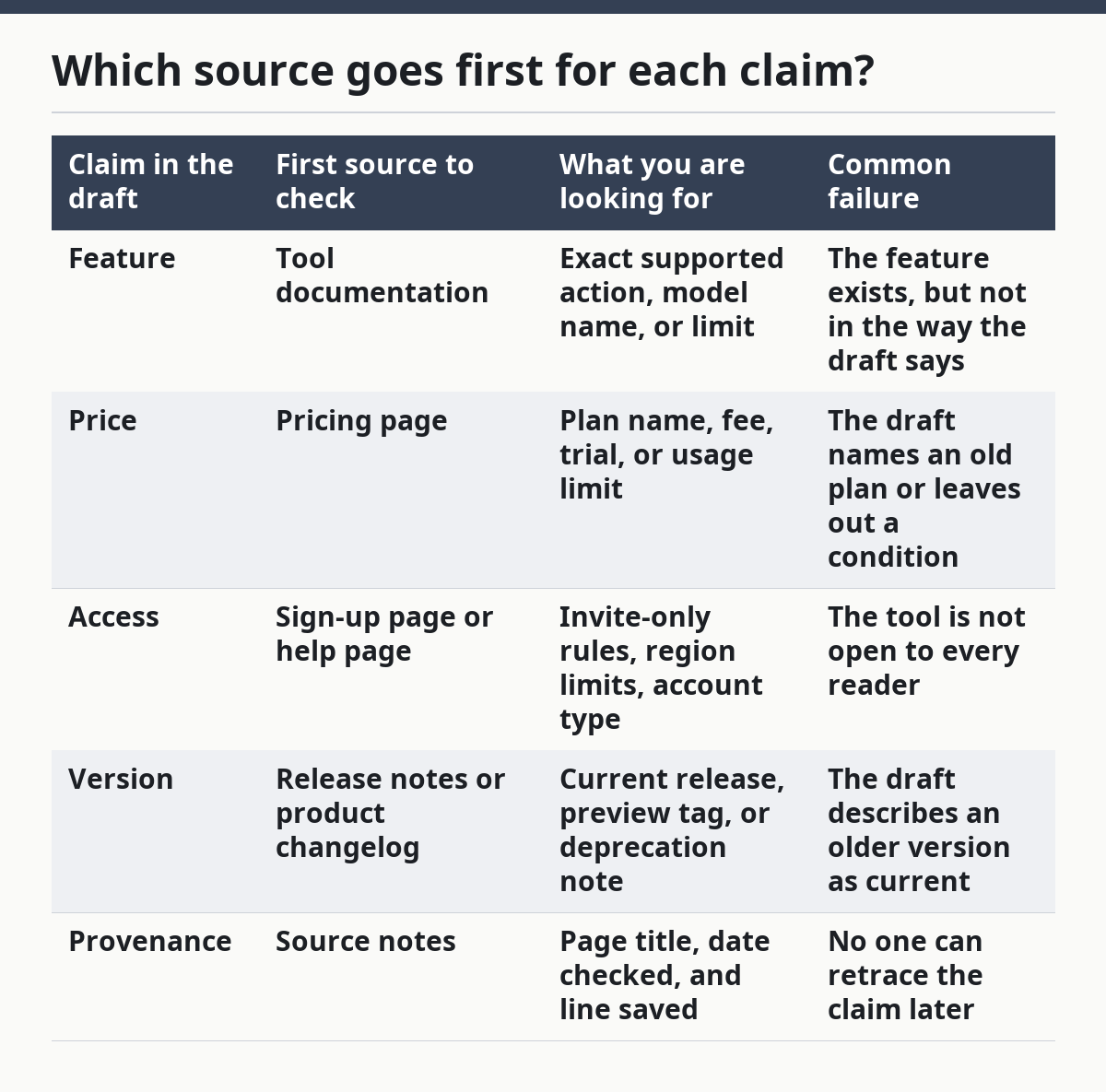
This order matters because the same tool can publish different facts in different places. A documentation page may describe a feature that the pricing page does not include on every plan. A changelog may say a feature shipped in one month and changed again the next.
The trade-off is simple: checking more than one page takes longer, but it cuts the chance of a stale mention. That matters most for tools with frequent updates, public betas, or pricing that changes by plan. If the tool is stable and the claim is narrow, three pages may be enough. If the tool ships often, check all four.
What usually goes wrong in AI tool mentions?
The usual mistakes are stale price language, vague feature wording, and version drift. Those errors are common because a draft can sound right even when it is a month out of date.
A stale price claim costs credibility fast. If a writer copies a number from an older post, the reader sees the mismatch first and the rest of the mention feels unreliable. The fix is simple: pull the number from the current pricing page and write the plan name exactly as shown there.
Vague feature wording causes a different kind of problem. Words like “supports,” “includes,” or “works with” can hide the real limit. If the documentation says a feature is preview-only or limited to a certain workflow, say that. A clear limit is better than a broad sentence that turns out to be false.
Version drift is easy to miss. A changelog can show that a feature changed in a release, but the draft still reads as if the old behavior is current. That mistake is especially common with tools that ship weekly or monthly updates. The remedy is to tie the mention to the version or date when the behavior changed, or to leave the version out if it adds noise.
There is also a quieter mistake: mixing product claims with editorial claims. A tool page may say what the product does, but it will not tell you whether the mention belongs in the newsletter. That judgment sits outside the fact-checking workflow. This page should keep you honest about the facts; it should not decide whether the tool is worth featuring.
How do you keep source notes useful later?
You keep source notes useful later by writing them in a fixed format and saving the exact page that supported the claim. A note without a page name or date checked is hard to trust when the tool changes next week.
Use one note line per claim. A simple format works: source type, page name, date checked, and the claim it supports. For example, a note might point to the documentation for the feature, the pricing page for the cost, and the release notes for the version. That gives you a clean trail without forcing you to write a long summary.
Keep the notes close to the draft, not in a separate folder you will forget. If the workflow lives in a newsletter draft, CMS note, or shared sheet, the next editor can find it in under 1 minute. That matters when a tool changes and someone needs to update the mention before the next send.
Use source notes to spot patterns too. If the same vendor changes its pricing page often, you will know to re-check it every time before publication. If the changelog is quiet, the workflow can stay lighter. The note is not just a record; it is a clue about how often the page needs another look.
If the mention will support the free ai tools newsletter hub, keep the note detailed enough that the hub can point back to the same evidence later. That saves rework when the same tool appears in more than one issue.
How often should you re-check tool details?
You should re-check tool details whenever the draft changes, the publish date moves, or the vendor updates its docs, pricing, or changelog. For fast-moving software, waiting until the day of publication is often the safest choice.
A practical rule is to check again after any gap long enough for product pages to change. That can be a day, a week, or longer depending on the tool, but the real trigger is change, not the calendar alone. If the tool has a release note or changelog dated after your first check, treat that as a fresh review point.
The cost of skipping a re-check is a correction later. A single changed plan name or a modified feature label can make the whole mention look sloppy. That risk is highest for AI tools that ship often, use preview labels, or adjust access rules without much warning.
The honest trade-off is time. Re-checking slows the workflow, but it protects the editorial record. For a newsletter team, that is usually the better exchange, especially when the piece includes a named plan, a price claim, or a feature tied to a specific version.
What should you verify before featuring an AI tool?
You should verify the feature, the price, the access rules, the current version, and the exact source language before featuring an AI tool. Those five checks catch most of the mistakes that turn a clean mention into a correction.
The feature check confirms that the tool really does what the draft says it does. The price check confirms that the cost language is current. The access check confirms that readers can actually reach the tool without hitting a region block, waitlist, or plan limit.
The version check matters when the tool ships updates often. A mention can be accurate and still be out of date if the draft describes a prior release. The source-language check keeps the note traceable when someone needs to verify it later.
A good workflow does not just protect the newsletter; it protects the editor’s time. A short source trail beats a long apology after publication.
How do you check if an AI tool still works?
You check if an AI tool still works by reading the current docs, pricing page, and changelog, then confirming that the draft describes the current behavior. If the feature has moved, been renamed, or been limited to another plan, the mention needs a rewrite.
The fastest signal is a recent product changelog or release note. If the vendor has changed the feature in the last update, assume the old wording is stale until the current page proves otherwise. When a tool uses model names or version tags, copy them exactly instead of paraphrasing.
If the pages disagree, use the newest authoritative page for the claim you are making and note the conflict in your source notes. That is better than forcing the draft to sound tidy when the product pages do not agree.
How often should you re-check tool details?
You should re-check tool details before publication and again any time the draft sits long enough that the vendor might have changed the page. A daily newsletter and a monthly newsletter do not need the same review rhythm.
For a daily or weekly send, the review usually belongs in the final pass, not in the first draft. For a slower schedule, the review should happen close enough to publish time that a pricing page or changelog update would still be caught. If the tool is known to update often, the final check matters more than the first.
The simplest standard is this: if the draft depends on a number, a plan name, or a version, verify it again right before it goes live. That one habit catches the most expensive mistakes.
Drafted with AI; not yet reviewed by a person.
