
Last updated: November 20, 2026
Use an editorial notes system that saves the tool name, source links, claim references, and change history in one place. That is the fastest way to keep a free AI tools newsletter accurate when tools change fast and old links go stale.
What should an editorial notes system hold?
An editorial notes system should hold four things for every tool: the source link, the claim, the date checked, and the edit trail. That is enough to answer later questions like “Where did this come from?” without hunting through old tabs or chat threads.
A clean setup usually needs one research log, one content tracker, and one notes field for each tool. Keep the record short enough to scan in under a minute, but detailed enough that a second person could repeat the check from the same page. A bare minimum entry has the tool name, the landing page URL, one sentence on what the tool does, and the date the note was last reviewed.
Treat editorial notes as the working memory of the newsletter. Source links show where the fact came from, while the notes explain why it mattered and whether it was kept, cut, or rewritten. If a tool is mentioned in three issues, the note should still point back to the same original source rather than forcing a fresh search each time.
This page supports the free AI tools newsletter hub without repeating the hub’s topic list here. The job here is narrower: make the research file dependable enough that future issues do not start from zero.
How do you record a new free AI tool?
Record a new free AI tool by capturing the source, the claim, the status, and the edit note in one pass. A simple 5-field entry is easier to keep current than a loose folder of screenshots and half-finished drafts.
- Open the tool’s site and save the main URL in the research log, so the source link is tied to the exact page the claim came from.
- Read the tool’s pricing or access page and note the free tier in one short line, so the newsletter does not blur “free” with “free trial.”
- Copy the feature claim into the editorial notes, using the tool’s own wording only when it is specific, so the record matches the source.
- Add the date checked in a fixed format, such as day-month-year or year-month-day, so old entries are easy to sort.
- Mark the status in the content tracker as draft, verified, or hold, so the tool does not get reused before the note is ready.
- Write one change note that explains what was kept or cut, so later edits have a clear reason rather than a mystery.
This is the kind of entry that saves time later. If a tool’s page changes next week, the original note still says what was true when the newsletter was written, and the content tracker shows whether it belongs in the next issue or not.
What goes in source links and what goes in notes?
Source links point to proof; notes explain editorial judgment. The two are not interchangeable, and mixing them is the fastest way to create a messy file that nobody trusts.
| Item | Put it here | Example of what belongs |
|---|---|---|
| Source link | Research log | The tool’s homepage, pricing page, help page, or changelog |
| Editorial note | Notes field | Why the tool was included, what was unclear, what needed rewording |
| Claim reference | Notes field plus source link | “Free tier includes X” with the exact page URL attached |
| Change history | Content tracker | “Updated copy on 2026-01-14” or “Removed due to broken link” |
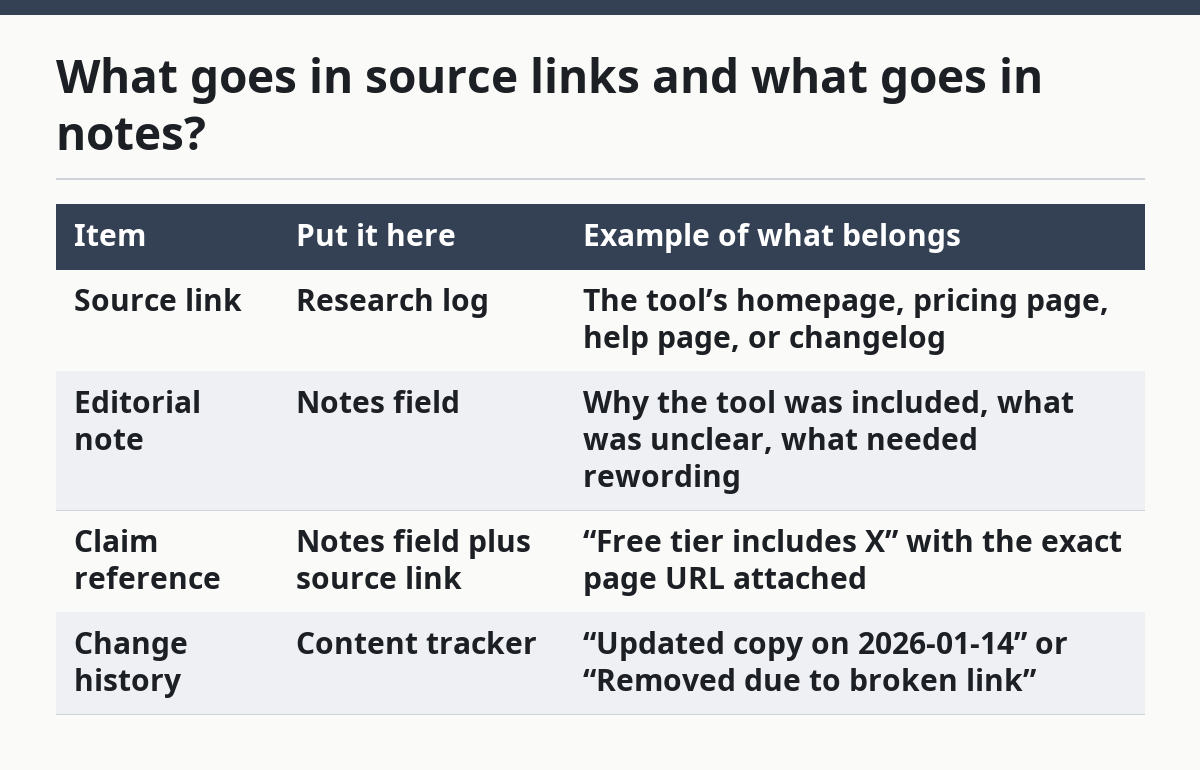
The rule is simple: if a fact could be checked by someone else in 30 seconds, keep the URL with it. If it is your judgment about fit, clarity, or importance, keep it in the note. That separation matters most when the newsletter covers 10 or more tools in one issue, because mixed records become impossible to scan.
A good note also shows what not to say. If a landing page is vague, the note should say “avoid claiming unlimited use” or “do not mention integrations unless confirmed.” That kind of guardrail keeps later edits honest and stops the same weak claim from slipping into every draft.
How should change history be recorded?
Change history should record what changed, when it changed, and why the record changed. That sounds plain, but it is the difference between a file that explains itself and one that forces a fresh audit every time.
Use a short change line for each edit, even if the edit seems tiny. “Reworded feature claim after page update” is better than leaving the old note in place and hoping someone remembers what happened. A timestamp matters here, because newsletter files often stretch across multiple issues and a note from 3 weeks ago can be wrong today.
Keep one rule for claim references: if the claim is delicate, attach the source link right next to it in the notes field. That is useful for wording like “free,” “no signup,” or “no credit card,” because those claims are easy to overstate. If the source does not support the wording cleanly, the change history should say that the claim was softened or removed.
A basic change trail can live in the same spreadsheet as the research log, but it needs its own columns. A date column, a change column, and a reviewer column are enough for a small newsletter team. Without those three fields, the file becomes a pile of old copy with no clear path from source to issue.
What mistakes make the file hard to trust?
The biggest mistake is saving only the link and skipping the reason the tool was included. That forces a later editor to guess why the item mattered, and guessing is how weak claims get reused.
A second mistake is burying source links in a long paragraph. A link hidden inside 6 lines of prose is slower to check than a link in a single cell, and slow checking leads to skipped checking. Keep one source link per tool entry, then add extra links only when the claim really needs them.
A third mistake is using the notes field for everything. When the same box holds the source, the opinion, the reminder, and the rewrite, nothing is easy to find later. The fix is to split the file into clear parts: source links in one place, editorial notes in another, and change history in a third.
A fourth mistake is leaving the date out. A note without a date checked is only half a note, because it does not tell anyone how old the claim is. For a free AI tools newsletter, where product pages can shift in a week, that missing date can send a stale tool back into the draft.
This page is not the place to solve archiving sent issues, handling late-breaking updates after publication, or building a full one-person workflow. Those are different jobs. Here, the goal is narrower: make the research record trustworthy before the issue goes out.
How does an editorial notes system help a newsletter stay accurate?
An editorial notes system helps a newsletter stay accurate by making every claim traceable in under 1 minute. That speed matters when a draft has 8 tool mentions and only a few minutes to confirm which ones are still current.
It also helps with reuse. A strong note means a tool can be brought back in a later issue without starting from scratch, because the source link, claim reference, and change history are already there. That cuts down on duplicate research and reduces the chance of repeating a broken claim from an old draft.
The system is not for every team in the same form. A solo writer may keep all fields in one spreadsheet, while a larger team may split the research log from the content tracker. The format can change, but the rule should not: every tool mention needs a source link, a note, and a date checked.
For a newsletter focused on free AI tools, that discipline is especially useful because “free” can mean different things on different pages. One tool may be free with limits, another may be free after sign-up, and another may only offer a free trial. The notes system should record the exact wording and avoid smoothing over the difference.
What does a simple setup look like in practice?
A simple setup looks like a spreadsheet with 5 columns and 1 status field. That is usually enough to keep the research log, editorial notes, source links, and content tracker in one place without turning the file into a maze.
A practical layout is:
- Tool name
- Source link
- Claim reference
- Date checked
- Editorial note
- Status
That structure keeps the core record compact. The source link is easy to click, the claim reference is easy to scan, and the status tells the editor whether the item is still draft, ready, or parked. A second sheet can hold change history if the newsletter is long-running and issue counts start to stack up.
The layout should also make room for corrections. If a tool page changes, the new note should not erase the old one; it should sit next to it with a newer date and a short explanation. That way the record shows the edit trail instead of hiding it. A reader never sees that file, but the quality of the file shows up in every issue that follows.
Key takeaways
- Save the proof and the judgment in different places so the record stays easy to scan.
- Track the date checked for every tool, because a free tier can change quickly.
- Keep one note for the reason a tool was included and one source link for where the claim came from.
- Use a simple status label, such as draft or hold, so the content tracker shows what is ready.
- Write change history in short lines so later edits do not turn into guesswork.
FAQ
How do you organize research for a newsletter?
Organize research in one central file with clear fields for tool name, source link, claim reference, date checked, and editorial note. That keeps the research log separate from the draft and makes it easier to sort items by status. A spreadsheet works well when the newsletter covers many tools in a single issue.
What should be saved with each tool mention?
Save the source link, the exact claim you plan to use, the date checked, and one short note on why the tool belongs in the issue. If the claim is about the free tier, keep the wording tight so “free” does not slide into “free trial” by accident. A status field helps too, especially when items move between draft and ready.
How do you track source links for editorial use?
Track source links in a research log, not inside the draft paragraph. Put one primary link next to each tool entry, then add a second link only when the claim needs extra support from a pricing page, help page, or changelog. That makes later checks faster and keeps the editorial notes readable when the file grows.
Drafted with AI; not yet reviewed by a person.
