
Last updated: November 19, 2026
Key Takeaways
- A topic map stops the newsletter from drifting into the same few tool types every week.
- Rotate each tool’s role, not just the tool, so it feels new without being new.
- Three distinct angles make one issue feel fuller than three near-duplicates.
- Reader segments prevent the same tool story from sounding identical to everyone.
A free AI tools newsletter gets repetitive when every issue looks like the last one. How to keep a free AI tools newsletter from becoming repetitive is mostly a planning problem, not a writing problem. Use content rotation, reader segments, and a living topic map so each send has a different angle, even when the tools overlap. The steps below show how to keep the archive from feeling like déjà vu.
Start with a topic map, not a blank draft

A topic map keeps the newsletter from drifting into the same three tool types every week. Build one list with 8 to 12 buckets: writing, image, video, agents, search, workflow, prompts, and monitoring. Then mark each bucket with the last issue it appeared in, so you can spot the gaps before you start writing.
Picture this: you’re staring at a folder full of links, and three of them all do the same job. A topic map gives those links a place to live, so you can choose an angle instead of grabbing the first shiny thing. That matters because repetition often starts at the idea stage, not the editing stage.
Use a simple grid with three columns:
- Topic bucket
- Last used date
- Next angle
That third column is the part most people skip. “Image tools” is not an angle; “image tools for product mockups” is. “Workflow” is not an angle; “workflow tools that replace a spreadsheet step” is. Specific beats broad every time.
You do not need fancy software. A spreadsheet, Notion page, or even a plain text doc works if it shows the last 4 to 6 issues at a glance. If you can scan it in 30 seconds, it will actually get used.
How to keep a free AI tools newsletter from becoming repetitive by rotating tools
You avoid repeating the same tools by rotating the role each tool plays, not just the tool itself. One AI app can appear as a headline item once, a quick mention later, and a comparison point after that, instead of being the main attraction three issues in a row.
Here’s the catch: readers do not always mind seeing the same product again, but they do mind seeing the same pitch. If you repeat the same “best for writers” angle, the issue feels stale even when the tool name changes.
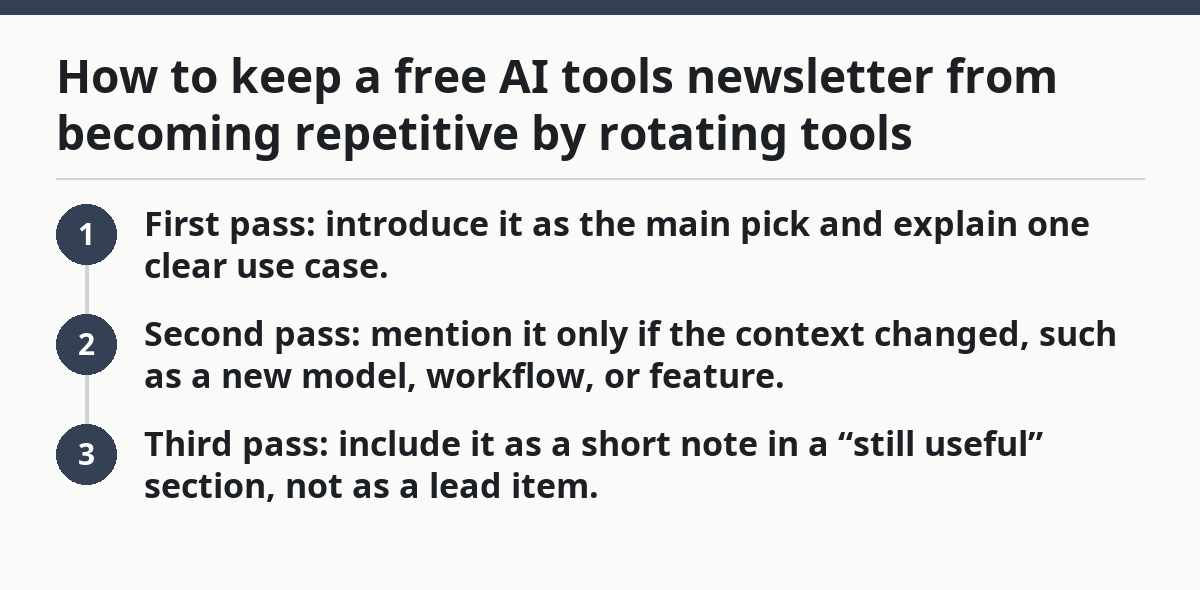
Use a 3-pass rule for any tool that comes back:
- First pass: introduce it as the main pick and explain one clear use case.
- Second pass: mention it only if the context changed, such as a new model, workflow, or feature.
- Third pass: include it as a short note in a “still useful” section, not as a lead item.
That keeps the archive from turning into a loop. It also helps you build trust, because the newsletter stops acting like every tool is brand new.
A practical check: if you have used the same tool in the last 4 issues, ask whether the reader needs a new reason to care. If the answer is no, park it for one cycle and use a different bucket from the topic map instead.
Build one issue from three different angles

One issue gets more life when it has 3 distinct angles instead of 3 near-duplicates. Pick one main tool, one comparison, and one smaller note that serves a different reader need. That mix keeps the issue from sounding like a list copied from a directory.
Picture this: you have one newsletter slot, but four possible ideas. If you treat all of them as “tool coverage,” you get mush. If you sort them into “pick, compare, warn, and save for later,” the page has shape.
A useful pattern looks like this:
- Main feature: one tool and one task
- Comparison slot: two similar tools with a clear difference
- Sidebar note: one tip, shortcut, or hidden limit
- Archive link: one older issue that still matters
This structure works because it spreads attention across different kinds of information. A new tool gets discovery. A comparison gets context. A sidebar note gives the issue a voice beyond product names.
The truth is, many repetitive newsletters are not too long; they are too flat. Every block says, in effect, “here’s another tool.” Instead, ask what each block does for the issue. Does it teach, contrast, warn, or save time? If it does the same job as the last block, cut it.
A quick test: read the first sentence of each section aloud. If three of them could be swapped without changing the meaning, the issue needs a different angle.
Segment readers so the same issue feels new
Segmenting readers keeps the newsletter from repeating itself because different groups need different parts of the same tool story. A beginner, a solo marketer, and a technical builder will not all want the same use case, even if the tool is identical.
Picture this: you have one AI tool, but your list includes a founder, a content lead, and a hobbyist. If you write only for the founder, the other two get a generic recap. If you split the issue into reader segments, each person sees a different reason to stay subscribed.
Use 3 to 5 segments at most. More than that, and the issue starts to feel chopped up. Good starter segments look like this:
- Solo creators
- Small teams
- Technical users
- Budget watchers
- Busy managers
Then give each segment a different kind of payoff. Solo creators may want speed. Technical users may want API access or model choice. Budget watchers want free tiers and limits. Busy managers want the shortest path to a result.
This is where repetition hides. A newsletter can repeat the same tool while still feeling fresh if the use case changes. The same summarizer can appear in one issue as a research helper and in another as a meeting note cleaner. Same product. Different job.
If you only have room for one segment callout, rotate that too. One issue can lead with “for solo creators,” and the next can lead with “for teams that need approval steps.” That small shift changes the tone of the whole send.
Review the archive before you write the next send
Reviewing the content archive before drafting saves you from accidental repeats. Spend 10 minutes checking the last 6 to 10 issues for tool names, topics, and headline patterns. That is usually enough to catch the obvious copy-paste drift before it reaches the inbox.
The archive is not just storage. It is the memory of the newsletter. If you do not check it, you will keep rediscovering the same tools and writing about them as if they are new.
A simple review pass should ask four questions:
- Which tools were featured?
- Which topics showed up twice?
- Which segment got attention?
- What headline shape was reused?
That last one matters more than most writers expect. Even if the tools change, the issue can still feel repetitive if every headline follows the same pattern: “Tool name + free + for X.” Readers notice the rhythm fast.
Use the archive to make two lists:
- Do not repeat yet
- Can return with a new angle
That second list is where older tools can live again without draining the newsletter. A tool can come back after a feature update, a new use case, or a different audience segment. If nothing has changed, leave it alone.
The best archive review is boring, and that is the point. It should feel like checking inventory, not brainstorming from scratch. Once that step becomes routine, the newsletter stops repeating itself by accident.
Fresh angles come from constraints, not from novelty
Fresh angles come from a limit, a shift, or a comparison — not from trying to sound inventive. If you need a different take, change the lens: speed, cost, setup time, output quality, privacy, or learning curve. That gives the same tool a new shape.
Picture this: you already covered an AI note-taker last month. This week, instead of calling it “another note app,” ask whether it works better for meetings, for interviews, or for post-call summaries. One tool, three angles, and each one feels more useful than a recycled promo line.
Good angle shifts include:
- Cost: free tier limits, hidden paywalls, upgrade pressure
- Time: setup in 5 minutes or a workflow that takes a full hour
- Output: decent drafts, rough drafts, polished drafts
- Control: prompt-based, template-based, or API-based
- Risk: privacy concerns, output errors, or vendor lock-in
These are not gimmicks. They are the facts readers use to decide whether a tool matters to them. A new angle also helps you avoid writing the same review in different clothes.
Now, you might be wondering whether you need a brand-new tool every issue. You do not. You need a different question. That is the real fix for repetition. The tool can stay; the lens has to move.
A helpful habit is to keep 5 angle prompts pinned above your draft:
- What changed?
- Who is this for?
- What is the trade-off?
- What is the shortcut?
- What should the reader skip?
Those prompts force variety without inventing noise. They also keep the issue honest, which matters more than sounding clever.
Keep a repeat filter for headlines, intros, and endings
A repeat filter keeps the same structure from making the newsletter feel stale. Headline, intro, and ending are the parts readers remember most, so rotate those first. If the body has variety but the frame is identical, the whole issue still feels recycled.
Picture this: the tools are new, but the page opens with the same promise, uses the same transition, and ends with the same “stay tuned” line. That is enough to trigger boredom even when the content is solid.
Build a small style checklist:
- Headlines: rotate between tool, use case, and problem
- Intros: start with a result, a question, or a tension point
- Endings: close with a next step, not a soft shrug
- Calls to action: vary between reply, click, and save
This also helps with the archive review. If five issues in a row open with “Here are this week’s free tools,” the reader learns to skim. A sharper opener can say what changed, what is useful, or what to ignore.
Keep one rule in mind: if the first 2 lines of the issue sound like the last 2 lines of the previous issue, the repeat filter has failed. Change the frame before you change the content.
What to stop doing when the newsletter feels stale
You should stop padding the issue with weak extras when the newsletter starts to feel stale. One half-interesting tool, one stale comparison, and one filler tip will not save it. A shorter, sharper issue is better than a long one that repeats itself.
The most common mistake is filling space with the same category of item because it is easy to find. That creates a loop: more tools, less signal. The fix is not volume; it is rotation.
Avoid these traps:
- The same type of tool every week
- The same opening sentence
- The same “top pick” tone
- The same segment every time
- The same archive blind spot
If you hit that wall, cut back to a single strong theme for one issue. Then use the archive to rebuild the next few sends with different buckets. A reset issue can do more for trust than a crowded one.
The truth is, repetition usually comes from fear. It feels safer to cover one known category over and over. But a newsletter gets stronger when it moves through the map on purpose, not by accident. That is how the archive stays useful instead of predictable.
A simple rotation system you can use this week
A simple rotation system keeps the newsletter fresh without turning planning into a job of its own. Pick 4 rotating lanes — for example, new tool, comparison, workflow, and reader tip — and assign one lane to each issue in a month.
Picture this: you sit down on Monday and know exactly what lane this issue belongs to. That removes guesswork and keeps you from reaching for the same type of content out of habit.
Use this monthly cycle:
- Week 1: one new tool with a clear use case
- Week 2: two tools compared on one task
- Week 3: one workflow that uses a tool already covered
- Week 4: one reader segment with a niche angle
Then add one archive rule: nothing returns as the main feature within the next 4 issues unless the use case is genuinely different. That small delay creates breathing room and makes each appearance feel earned.
This is the part that most generic advice skips. Freshness is not random inspiration. It is a system that keeps the same content pool from getting stale. If you want the newsletter to stay worth opening, rotation has to be built into the calendar, not rescued at the last minute.
For a broader checklist, the guide on Free AI tools newsletter — The Complete Guide fits alongside this page without repeating it. The archive review template can also help you track repeats, and the topic map worksheet gives you a simple way to plan the next four issues.
How do you avoid repeating the same tools?
Use a rotation rule and a content archive together. The archive shows what has already run, and the rotation rule tells you when a tool can return with a new angle. If the same tool appears again, change its role or its audience segment so it does not read like a rerun.
How often should themes be rotated?
Rotate themes every issue or every month, depending on how often you send. A weekly newsletter usually needs a theme shift every send, while a monthly issue can hold one theme across the whole edition if the angle changes inside it. The key is to avoid two or more back-to-back issues that feel built from the same mold.
Why this matters for a free AI tools newsletter
A free AI tools newsletter lives or dies on perceived value, and repetition lowers that value fast. In 2024, 95% of American adults used the internet, according to the Pew Research Center, so readers have lots of places to find tool news and fewer reasons to stay with a newsletter that feels recycled. (Source: Pew Research Center)
The topic map, archive review, and rotation system work together because they reduce the chance of overlap before the draft starts. The U.S. General Services Administration also recommends plain, user-centered content patterns that help readers find what matters faster. U.S. (Source: General Services Administration)
For AI tools specifically, OpenAI reported 100 million weekly active users for ChatGPT in 2024, which shows how crowded the tool space has become. When readers already see similar tools everywhere, a newsletter needs clear differences, not extra filler. (Source: OpenAI)
A free newsletter does not need more links to feel useful. It needs fewer repeats, clearer angles, and a steadier plan. That is what keeps the inbox from feeling like the same issue on a loop.
Drafted with AI; not yet reviewed by a person.
