
Last updated: November 20, 2026
Quick Answer: 2 or 3 sentences is often enough for a correction in an AI tools newsletter, especially when it names the wrong fact, the right fact, and where the update lives. In this guide to How to Write Corrections for an AI Tools Newsletter, the goal is a short public note that keeps the record clear without rewriting the whole issue.
Why does a correction notice need a policy?
A correction notice needs a policy because one wrong tool name, pricing detail, or feature claim can travel through an entire audience in under 1 day. A simple rule helps you decide what gets corrected, what gets clarified, and what only needs an archive note.
Start with a plain standard: if the mistake changes the meaning of the issue, publish a correction; if the wording was vague but not wrong, publish a clarification; if the change only affects a future reference, add a note in the issue archive. That gives your team one rule instead of a new judgment call every time.
For an AI tools newsletter, the policy should name the kinds of errors that matter most: model names, tool availability, free-plan limits, pricing language, release dates, and claimed features. Those details are easy to compress into one false sentence, and readers spot the error fast. A policy keeps the correction focused on the facts, not on the embarrassment.
Two useful editorial references are the Society of Professional Journalists Code of Ethics and the Reuters Handbook of Journalism. Both stress fast, clear error handling rather than defensive wording.
How do you write a correction notice?
A correction notice answers the error in 1 sentence, then states the fix in 1 sentence. The reader should not have to guess what changed.
Use this 3-part structure:
- Name the issue and the mistake.
- State the correct information.
- Say where the corrected version lives.
Example pattern: “Correction: In the March 12 issue, the note on Tool X misstated the free-plan limit. Tool X offers the free tier shown on its current pricing page, not the limit we listed. The issue has been updated, and this notice replaces the wrong line.”
That format works because it keeps the correction tied to the exact sentence, not the whole newsletter. It also avoids a long apology that buries the fact the reader came for.
Do not add a 6-line defense about why the mistake happened. Do not repeat the error in bold twice. If the reader needs context, give 1 short clarification sentence after the correction, not a mini-essay. A clean correction notice usually stays under 50 to 80 words.
If the mistake involves a tool comparison, keep the correction specific to the comparison point. For example, if you mixed up a 7-day trial with a free tier, correct that exact claim. Readers care about the difference between a trial and a free plan because those are not the same thing.
What should the correction say and not say?
A correction should say the wrong fact, the right fact, and the location of the fix. It should not say “sorry if anyone was confused” as a substitute for the correction itself.
In many cases, the safest wording uses concrete nouns: tool name, feature, plan, date, model, or source page. That makes the notice easy to scan on a phone. If the original issue said a tool had image generation and it did not, name image generation directly instead of hiding behind a vague phrase like “capability.”
Keep the tone neutral. A correction is not a brand statement and not a customer-service reply. It is a public record that the issue changed. That is why phrases like “we wanted to clarify” can weaken the notice if they replace the actual fix.
Use the table below when you need to choose between the 4 common update types.
| Update type | When to use it | What it should do | What it should not do |
|---|---|---|---|
| Correction notice | The issue contained a wrong fact | State the error and the right fact | Rehash the whole story |
| Clarification | The wording was true but too vague | Tighten meaning and remove ambiguity | Pretend the original was false |
| Public update | The tool changed after publication and the issue is still live | Mark the new status clearly | Hide the old claim without noting change |
| Issue archive note | The archived issue needs a record of the edit | Show what was revised and when | Rewrite history without a trace |
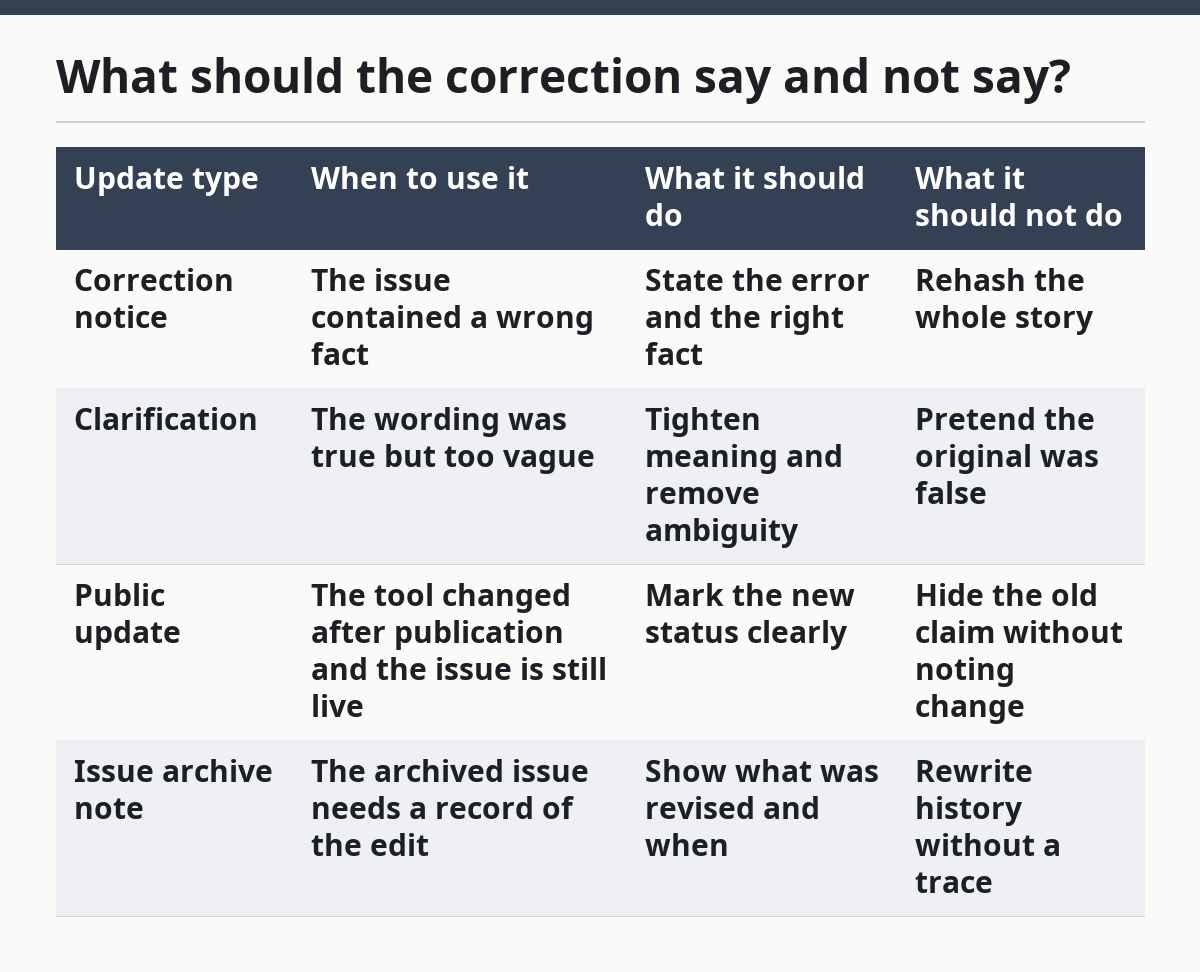
That table matters because a generic “edit” label can damage reader trust. Readers often forgive a correction faster than a blur. A correction notice works when it names the difference.
Where do you place the correction?

You place the correction on the issue page, in the next send if needed, and in any spot the original mistake may still be read. The main rule is simple: the correction has to sit close to the error.
For a newsletter issue page, add the correction at the top or directly under the affected item. If the issue has 5 tool mentions and only 1 is wrong, do not move the whole newsletter. Add a note beside that item and link the corrected version in the same place.
If the newsletter was emailed already, include a short correction in the next issue or in a standalone public update, depending on how visible the error was. A 1-line correction in the next send can work for a small factual slip. A wrong pricing claim or feature claim deserves a public correction notice on the issue page, too.
The placement should match the size of the mistake. A typo in a tool name can live inside the item. A wrong claim about a free plan should not sit in a buried footer. Readers should not have to hunt through 3 screens to find the fix.
Do not turn the correction into a separate article unless the original issue needs a full rewrite. Most newsletter mistakes do not. A short notice is easier to trust because it looks like editorial maintenance, not damage control.
Correction notice, clarification, or archive note?
A correction notice, a clarification, and an issue archive note serve different jobs, and mixing them makes the page harder to trust. The best choice depends on what changed in the original 1 issue.
A correction notice is for false facts. A clarification is for facts that were true but too loose. An archive note is for the record of what changed after publication. If a reader can still infer the original meaning without being misled, a clarification may be enough. If the original line was wrong, it needs a correction notice.
Use this simple comparison:
| If the problem is… | Use… | Example |
|---|---|---|
| Wrong pricing detail | Correction notice | “The free plan limit was misstated.” |
| Unclear wording | Clarification | “The tool supports text prompts, not full automation.” |
| Live update after publication | Public update | “The feature is now available.” |
| Internal record of an edit | Issue archive note | “Item revised on Tuesday at 3 p.m.” |
This matters because a clarification can sound like a correction if it is too broad. That can make the newsletter look slippery. Readers are fine with a plain correction. They are less forgiving when a vague “clarification” is used to cover a mistake that should have been named.
Keep the labels stable. If you call a wrong fact a clarification one week and a correction the next, readers lose the pattern. A 1-word label can carry a lot of trust when it is used consistently.
What mistakes damage reader trust fastest?
The fastest way to damage reader trust is often to hide the exact error or to rewrite the whole issue without saying what changed. Readers notice when the correction sounds bigger than the mistake.
A common mistake is overexplaining. A 4-sentence defense can make a small error feel larger than it was. Another is underexplaining, which leaves readers guessing whether the correction applies to the tool note, the headline, or the price. The fix is a short sentence that names the error and the replacement fact.
A second mistake is burying the correction in a footer or a social post with no link back to the issue. That costs visibility. If the original issue is still online, the correction should meet it there. A footnote hidden below 10 other items is not enough when the error affected a tool recommendation.
A third mistake is changing the wording without telling readers that a change happened. That looks like silent editing. If the issue page now says something different, the correction notice should say that the item was updated after publication.
A fourth mistake is using a “minor edit” label for a real factual correction. That label can sound harmless, but readers care more about honesty than about the size of the error. If the issue said a tool had a 30-day trial and it did not, call it a correction, not a polish pass.
How do you keep the next issue clean?
You keep the next issue clean by carrying one short correction forward and then moving on. The next send should not reopen the mistake for 3 paragraphs.
Put the correction in a single line near the affected item or in a brief editor’s note. If the original issue linked to the wrong tool page, replace that link before the next send goes out. If the error involved a feature claim, update the description so the same sentence does not reappear in a future round-up.
A useful habit is to add a 1-minute pre-send check for the items most likely to shift: tool names, plan limits, release notes, and availability. That is not a guarantee, but it cuts down on repeat errors in a weekly newsletter where the same tools often come back into rotation.
Use the issue archive carefully. The archive should show the corrected version and the correction notice, not a silent rewrite with no trace. Readers, editors, and future contributors all benefit when the archive shows what changed and when. A clean archive is part of the correction process, not a separate chore.
The point is not to make the newsletter look perfect. The point is to make the correction visible enough that a reader can trust the next issue. A newsletter that owns a mistake in 1 clear line usually looks stronger than one that tries to erase it.
Key takeaways
- A correction notice should name the wrong fact, give the right fact, and point to the updated issue.
- Keep the wording short and factual; a 2-sentence notice is often enough.
- Use a correction for false facts, a clarification for vague but true wording, and an archive note for the record.
- Put the fix where readers will see it: on the issue page, in the next send, or both.
- Silent edits can cost more trust than a plain public notice.
FAQ
When should a newsletter issue be corrected?
An issue should be corrected as soon as the mistake is confirmed and the right fact is available. If the error changes a tool recommendation, pricing claim, or feature description, do not wait for the next full send. A short public correction on the issue page is better than letting the wrong line sit for 7 more days.
How do you write a correction without overexplaining?
Write the error, the fix, and the location of the update in 2 or 3 sentences. That is enough for most newsletter mistakes. Leave out the backstory, the defense, and any extra apology that does not help the reader understand the change.
Should corrections be emailed or posted elsewhere?
Post them where the original issue can still be read, and email them only when the error is large enough to affect the next send. A public issue-page correction handles the record, while a brief note in the next newsletter reaches readers who missed the first version. If you use both, keep the wording the same.
Drafted with AI; not yet reviewed by a person.
