
Last updated: November 19, 2026
Quick answer: a tool deserves a newsletter mention when it scores at least 3 of 4 on relevance, novelty, ease of use, and reader fit. How to judge whether an AI tool is worth a newsletter mention is the editorial question this guide answers. A newsletter mention is worth it only when the tool is relevant, new enough to matter, easy to try, and a good fit for your newsletter reader.
This guide shows the editorial rubric I’d use to sort real candidates from noisy tool launches, without pretending every shiny demo earns space.
Key Takeaways
- A mention should help the right person do a real task, not just fill a slot in a roundup.
- Newness matters, but only if the tool does something your audience can tell apart in 30 seconds.
- A weak onboarding flow can kill a mention, even if the feature list looks strong.
- A fast filter is: “Would my reader be annoyed if I spent one of their clicks on this?”
- If the tool needs a long setup, hidden paywall, or vague promise, it usually belongs in a skip pile.
What makes a tool worth featuring?
A tool is worth featuring when it solves a clear job for a newsletter reader and gives you a reason to talk about it in one sentence. That sounds simple, but it’s the whole game. A tool launch that is merely “another AI app” is not enough.
Picture this: you’re scanning a launch page between editing deadlines and you have maybe 90 seconds to decide whether this item deserves a slot. The best filter is editorial worthiness, not excitement. If the tool cannot explain its job, its difference, and its first action fast, it probably won’t help your audience either.
Use a quick three-part check before anything else:
- Problem fit: What task does it handle?
- Difference: What does it do that similar tools don’t?
- Proof of use: Can a person try the core action in minutes, not an afternoon?
A tool can score well on one and still fail the others. For example, an AI writing assistant may solve a common task, but if the output looks like every other assistant and the setup asks for a 20-step workspace build, it loses editorial value fast. On the other hand, a small tool with one sharp use case can earn a mention if it saves time in a way a newsletter reader can feel immediately.
This is where many generic roundup posts go wrong. They treat novelty as the same thing as worth; if you are unsure how to judge that tradeoff, consult a professional editor or content strategist and check a source such as the Reuters Institute’s journalism guidance on audience trust and editorial judgment. A mention should earn attention, not borrow it. If the item needs a paragraph of explanation before the benefit makes sense, the fit is already weak.
The quickest sentence test helps: write the mention in one clean line. If the line sounds flat, crowded, or vague, the tool may still be useful, but it is not necessarily newsletter-worthy. That judgment keeps your issue from filling up with near-duplicates.
How do I know if the tool is actually new, not just renamed?
A tool feels worth mentioning when the novelty is visible in the product, not just in the launch copy. “New” is not the same as “different enough to matter,” and that distinction saves you from repeating last month’s roundup with a fresh coat of paint.
Picture this: you’re looking at a launch page that promises “AI for everything” and a product video that could describe half the category. The right question is not whether the product is new to the internet. It’s whether the feature set gives your audience something they can’t already get from the last 3 tools you mentioned.
Look for these signs of real novelty:
- A workflow change, not just a new model name.
- A narrow use case with a clear before-and-after.
- A feature that changes what a user does in the first 5 minutes.
- A format shift, such as browser-based capture, shared workspace, or live extraction, if that matters to your audience.
The catch is that “novelty” can hide bad product design. A tool can be fresh and still be a poor mention if it depends on an awkward setup, a closed beta, or a feature that only works in one narrow environment. If the gimmick is the only thing standing out, the tool is probably too thin for editorial space.
A practical test: compare the new tool against 2 existing options in your category. If you can’t name a clear edge in under 30 seconds, the novelty is probably cosmetic. That does not mean the tool is bad. It means it may not deserve scarce newsletter real estate.
For a launch-driven format, this matters even more. Readers forgive one familiar category item if the twist is obvious. They do not forgive repetition dressed up as discovery.
The editorial rubric I use before saying yes

A tool deserves a mention when it clears a simple rubric on relevance, usefulness, ease of adoption, and reader fit. That rubric should be written down, not held in your head, because the worst editorial misses happen when a tool “feels good” in the moment and weak in hindsight.
Picture this: you have a shortlist of 6 AI tools and only one or two slots left in the issue. A rubric turns that choice from a mood into a decision. It also keeps you from overvaluing a flashy launch or a polished landing page.
Use this core procedure:
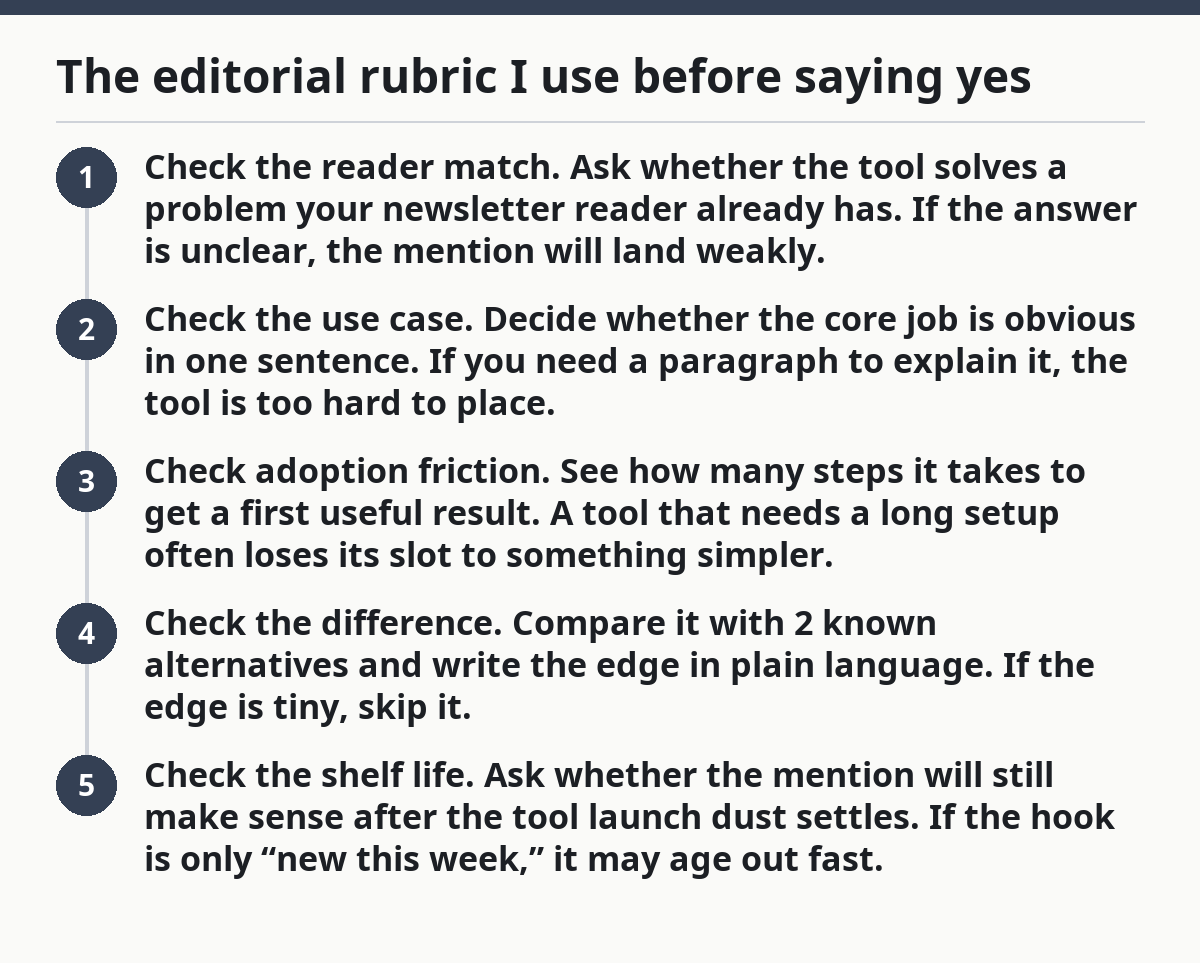
- Check the reader match. Ask whether the tool solves a problem your newsletter reader already has. If the answer is unclear, the mention will land weakly.
- Check the use case. Decide whether the core job is obvious in one sentence. If you need a paragraph to explain it, the tool is too hard to place.
- Check adoption friction. See how many steps it takes to get a first useful result. A tool that needs a long setup often loses its slot to something simpler.
- Check the difference. Compare it with 2 known alternatives and write the edge in plain language. If the edge is tiny, skip it.
- Check the shelf life. Ask whether the mention will still make sense after the tool launch dust settles. If the hook is only “new this week,” it may age out fast.
That order matters because a lot of editors start with novelty and end with relevance, which is backwards. Start with the audience, then the task, then the friction. Only after that do you weigh launch timing.
Here’s the catch: usefulness is not the same as depth. A tool can be modest and still be worth mentioning if it saves time on a small job your audience does often. A huge, ambitious platform can still miss the mark if the first useful action is buried behind sign-up walls, onboarding forms, or vague prompts.
A good editorial rubric should also reject “maybe later” candidates. If a tool might fit next month, it’s not ready now. That discipline keeps the newsletter from becoming a backlog of half-fit tools.
Which signs mean skip the mention?
Skip the mention when the tool is hard to explain, hard to try, or hard to trust. That is the honest answer, even if the launch looks polished and the homepage uses all the right words.
Picture this: you’re reading a launch thread and every sentence sounds exciting, but none of it tells you what a person can do on day one. That is a warning sign. A newsletter mention should make life easier for the reader, not hand them a scavenger hunt.
The biggest skip signals are these:
- Vague promise: “AI for productivity” tells you almost nothing.
- Hidden path to value: the core feature sits behind account setup, permissions, or multiple prompts.
- No clear audience: it tries to serve founders, marketers, students, and agencies at once.
- Copy-first positioning: the pitch sounds smarter than the product behaves.
- No visible edge: it does the same thing as a dozen tools already on your list.
A common mistake is treating “launch” as its own reason to feature something. If you are unsure whether to make that call, consult a professional editor or content lead and check a source such as the Columbia Journalism Review on editorial standards. Launches create urgency, not value. If the tool doesn’t offer a real reason to pause, it should wait. That is especially true when the item would crowd out a better-fit tool that solves a more concrete problem.
Another mistake is assuming polished branding means editorial fit. A clean interface can hide a weak workflow. A rough interface can still deserve a mention if the result is strong and the first use case is obvious. Form matters, but not more than function.
A good rule: if you cannot explain the tool without using the word “platform,” you may not have enough substance for a mention. Platforms are broad. Readers want a clear use, not a label.
How much friction is too much for a newsletter reader?
Too much friction is anything that makes a reader work harder than the payoff justifies. For newsletter use, friction is measured in steps, not in company ambition. If someone needs 10 minutes just to see the point, the mention may be too expensive for the issue.
Picture this: you click a link expecting a fast look, then hit sign-up, email verification, workspace creation, permission prompts, and a blank dashboard. That is not a good first impression for an editorial mention. A reader should feel oriented quickly, or they will stop caring before the tool earns its keep.
Watch for friction in these places:
- Sign-up that asks for too much before first use.
- A blank state that gives no hint what to do next.
- A demo that looks impressive but doesn’t translate into a task.
- Pricing or limits that hide the main function.
- A workflow that needs extra software just to begin.
Ease of adoption matters because a newsletter mention is not a full review. You have limited space, and the reader has limited patience. A tool with a modest feature set can still win if it shows value fast. A tool with a rich feature set can still lose if the path to value is long.
This is also where reader fit changes the judgment. A technical audience may accept more setup if the payoff is strong. A general audience will not. The same tool can be worth mentioning in one newsletter and a bad fit in another. That is not inconsistency; it is editorial discipline.
So the best part is that you do not need perfect certainty. You only need a repeatable threshold. If the product makes the reader jump through too many hoops, it is not ready for prime placement.
How to compare 2 similar AI tools without wasting space
Compare similar tools by the job they do best, not by a giant feature list. A feature dump helps no one. A short comparison shows why this one belongs in the issue and that one stays in the notes file.
Picture this: you have 2 AI tools that both summarize content, both promise speed, and both look decent on first glance. The question is not which one has more bullets on the homepage. The question is which one has a clearer editorial angle for your audience.
Use a simple comparison frame:
- Primary job: What exact task does each tool handle?
- Speed to value: How fast can a user get something useful?
- Target user: Who will feel the benefit most?
- Proof of difference: What is one feature that changes the experience?
- Mention value: Which one gives you a cleaner, sharper line in the newsletter?
If both tools solve the same task at the same level, you usually only need one mention. The second tool should only get space if it serves a distinct segment or offers a cleaner workflow. That keeps your issue from sounding like a copy-paste roundup of similar names.
A useful comparison also exposes bad fits. A tool may be good for power users but too dense for a general newsletter audience. Another may be perfect for beginners because it works in a browser, with no setup and no special knowledge. That distinction is often more valuable than feature count.
Do not compare on hype language. Compare on the first real result a person gets. If one tool gives a usable output in a few clicks and the other needs a tutorial, the decision is usually already made.
A practical yes/no checklist before the mention goes live
A tool should go live only if it clears your editorial threshold on the final pass. This last check is where a lot of weak mentions are saved from publication, and a lot of weak newsletters are saved from looking random.
Picture this: the issue is almost done, the slot is open, and the temptation is to fill it with “good enough.” That is exactly when the checklist earns its keep. Editorial pressure makes mediocre tools feel acceptable. A fixed threshold keeps the page honest.
Use this short yes/no list:
- Can I explain the tool in one sentence?
- Does it solve a real task my newsletter reader actually has?
- Is the difference from existing tools obvious?
- Can a person try the main feature quickly?
- Would I still mention it if it were not newly launched this week?
If you hit “no” on two or more of those, skip it. That does not mean the tool is bad. It means it is not worthy of scarce mention space right now.
One more filter helps in practice: ask whether the mention creates value on its own or only after a long explanation. If it needs a long explanation, it may be better for a deeper post, a category roundup, or a later issue when the product matures.
This is the real editorial threshold. Not “is it interesting?” but “is it worth the reader’s click, attention, and trust?” That question is the difference between a useful newsletter and a noisy one.
What should I do with tools that are almost good enough?
Treat almost-good-enough tools as candidates for later, not as forced mentions. A near miss is still useful if you keep a clean notes file, because many tools improve after a launch cycle or two.
Picture this: the tool has a clear use case, but the onboarding is clumsy or the output feels too close to a tool you already mentioned last month. That’s not a bad tool. It’s just not ready for prime space yet.
A simple holding pattern works well:
- Add the tool to a watch list.
- Note the one barrier that kept it out.
- Recheck it after a meaningful update, not after every small patch.
- Keep the bar the same for every candidate.
This approach protects your newsletter from filler and makes your editorial choices easier to defend later. It also helps you avoid a common trap: praising a product because the team is active, not because the product is ready.
If a tool improves its adoption path, sharpens its use case, or clarifies its difference, it may move from “not now” to “yes.” That shift is exactly what you want from a living editorial system.
Drafted with AI; not yet reviewed by a person.
