
Last updated: November 19, 2026
Quick Answer: in Tool Discovery and Curation: The Complete Guide, the practical number is one repeatable process applied to each candidate: define the job, compare the same fields, and review on a schedule. Finding the right tools is not the hard part; keeping a useful, current set without drowning in options is. Tool discovery works when you build a repeatable filter, and curation works when you remove more than you add. This guide settles what to look for, what to ignore, and how to keep a tool list from turning into a junk drawer.
Key Takeaways
- Tool discovery means finding software, apps, or services that can solve an existing job.
- Most tool lists fail because they reward novelty instead of fit.
- Tool discovery works best when you define the job, search in the right places, and record the same facts for each option.
- A tool earns a place when it solves the job cleanly, fits the team, and does not add more work than it removes.
What tool discovery and curation actually mean

Tool discovery is the process of finding software, apps, or services that might solve a job you already have. Curation is the harder half: choosing a small set, cutting the rest, and keeping the list useful over time.
Picture this: you’re staring at 40 tabs, 12 “best tool” posts, and a team asking for a recommendation by Friday. You don’t need more options; you need a filter, a shortlist, and a reason to trust both.
Because discovery and curation do different jobs, the same page should not treat them as one step. That split matters most when the list will be reused by other people, not just by you.
Here’s the catch: most lists mix discovery with sales. They tell you what exists, but not how to decide, compare, or retire a tool once the task changes.
- Discovery answers: “What could help?”
- Curation answers: “What stays on the list?”
- Maintenance answers: “What got stale?”
A good process separates those three jobs. If you blur them, every search turns into a fresh debate. For a concise framework on separating evaluation from selection, see NIST’s decision-making guidance.
Why most tool lists fail
Most tool lists fail because they reward novelty, not fit. A tool can be famous, well reviewed, and still be wrong for your workflow, your team size, or your budget.
Picture this: you’re reading a list that ranks tools by feature count, yet the work you need done lives in one simple workflow. That list may be accurate and still be useless. Feature depth is not the same as task fit.
The common mistakes are easy to spot:
- The list starts with brand names, not use cases.
- It treats every “top tool” as if the same buyer should want it, so a professional review or buyer’s guide is the safer way to compare options.
- It ignores the cost of switching, training, and cleanup.
- It never says what to skip.
The truth is, tool curation is less about finding the most powerful option and more about avoiding the wrong one. A team of 3 usually needs a different stack than a team of 30. A solo operator who wants one fast setup does not need an enterprise maze.
If you want a clean process, start with the job, not the vendor. That single move cuts noise fast. For a practical buying lens, use G2’s software comparison categories and cross-check vendor claims against the source page before deciding.
How to discover tools without getting buried

Tool discovery gets useful when it follows the same path every time: define the job, search in the right places, and record the same facts for each candidate. A casual search usually produces the same 20 names; a disciplined search produces a better shortlist.
Picture this: you’re trying to replace a spreadsheet, an old plugin, or a sticky manual process. The first result page will tempt you to stop early. Instead, keep going long enough to compare at least several candidates on the same criteria. The first 10 results are not a shortlist.
Use a simple discovery loop:
-
Write the job in one sentence.
Example: “I need a way to collect form responses and route them to a team inbox.” -
List the constraints before the tools.
Think platform, team size, required integrations, compliance, and setup time. -
Search by use case, not just by category.
“Form routing tool” is weaker than “form tool for internal approvals.” -
Capture the same fields for each candidate.
Try: primary use case, pricing model, integrations, permission controls, export options, and what the vendor does not say. -
Remove anything that fails a hard constraint.
If it won’t work on your platform, it’s gone.
This is where many people go wrong: they compare tools before they know what problem the tool must solve. That reverses the whole process. If you want better discovery inputs, start with Google’s Search Central guidance for structured queries and source checking, then verify details on the vendor site.
What to look for before a tool earns a place
A tool earns a place when it solves the job cleanly, fits the team, and does not create more work than it removes. A slick interface can hide weak export options, bad permissions, or painful setup.
Picture this: you’re down to three contenders. All three look fine on the surface, but one has clumsy admin controls, one lacks data export, and one needs too much setup. The right choice is usually the one with the fewest serious trade-offs on the criteria you set first. The best tool is the one that fails least badly on the things that matter.
Use this screen before you add anything to a curated list:
- Does it solve a specific job, not a vague promise?
- Does it fit the current stack without awkward workarounds?
- Can a new user learn it in a day, not a week?
- Does it export data in a format you can actually use later?
- Are permissions, audit trails, or approval steps present if the work needs them?
- Is the vendor clear about limits, or are the limits buried?
- Will it still make sense if the team doubles in size?
One useful habit: separate “nice feature” from “must-have.” A tool with 12 useful extras can still lose to a simpler one if the simpler one is faster, clearer, or easier to maintain. For product evaluation and lifecycle thinking, Atlassian’s buy-vs-build and tooling guidance is a useful reference point.
A quick scoring frame
A plain scorecard keeps the process honest. Use three buckets:
- Must-have: dealbreakers
- Should-have: strong preference
- Nice-to-have: useful, but not a reason to buy
If a tool misses a must-have, stop there. If it hits all must-haves, the rest becomes a trade-off instead of a debate. A simple scorecard also gives you a number to review later, not just a memory of why the tool looked good.
How to curate a tool list that stays useful
Tool curation is not a one-time cleanup. It is a maintenance habit. A list becomes valuable only when it gets trimmed, dated, and reviewed on a schedule.
Picture this: you’re managing a “recommended tools” page, a team wiki, or a personal stack. Six months later, half the links are stale, one vendor changed its pricing model, and nobody remembers why item seven is still there. A stale list damages trust faster than a short one.
A durable curation system needs four rules:
-
Set a cap.
A list with no ceiling becomes a dump. Pick a maximum number per category. -
Add a reason.
Every tool should have one line explaining why it belongs there. -
Mark the status.
Label items as current, watchlist, or retired. -
Review on a schedule.
A quarterly review is enough for many categories; faster-moving software may need monthly checks.
That last part matters. A tool can be good and still no longer belong on your list if support slipped, pricing changed, or the product stopped fitting your workflow. In practical terms, a 90-day review cycle catches drift before it becomes clutter.
What to remove first
Start with the tools that have the weakest proof. Remove anything that:
- Has no clear use case
- Overlaps another tool without adding value
- Lacks current vendor support
- Creates manual work instead of reducing it
- Has a hidden switch cost you’re ignoring
The best curated lists are boring in a good way. They are short, current, and easy to defend. In many teams, a list of 5 well-justified tools is more usable than a list of 15 uncertain ones.
Tool discovery and curation for teams, not just solo users
Team curation is harder than solo curation because the cost of a bad pick multiplies. One person can tolerate a messy interface; ten people may not. One contractor can adapt to a weird workflow; a department cannot.
Picture this: you’re choosing a tool for a group that shares files, approvals, and reporting. One person wants speed, another wants control, and a third wants visibility. If the tool only serves one role well, it is not team-ready.
Team decisions should include:
- Ownership: who maintains the tool
- Permissions: who can see, edit, approve, or export
- Training time: how long before a new user is productive
- Support path: what happens when the tool breaks
- Exit plan: how data leaves if you switch later
A tool can look strong in a demo and still fail in a team setting because it assumes everyone works the same way. They don’t. According to CISA’s guidance on secure software practices, ownership and maintenance are part of the risk picture, not an afterthought.
For that reason, team curation should ask one extra question: what happens when the main owner leaves? If the answer is “nobody knows,” the list is too fragile. In a team of 12, that one missing answer can turn a useful tool into a support problem overnight.
The honest side of AI tool discovery
AI can speed up discovery, but it also makes bad lists easier to generate. A model can summarize a crowded category in seconds, yet it cannot tell you whether the list is current, biased, or missing the one constraint that matters.
Picture this: you’re using AI to collect candidate tools for note-taking, customer support, or analytics. The output looks polished. The names sound plausible. Some are even real. Polished does not mean reliable.
Use AI for the first pass, not the final pass.
- Good use: drafting a long list of candidates from a category
- Good use: grouping tools by function or audience
- Good use: summarizing public feature claims
Bad use:
- Picking the winner without checking vendor docs
- Trusting outdated pricing or integrations
- Assuming popularity means fit
- Letting the model invent capabilities
The best way to use AI here is as a search assistant, not an authority. It can help you widen the net. It cannot replace checking the source page, the changelog, and the documentation. For current AI risk and accuracy considerations, see NIST AI Risk Management Framework.
The honest side-by-side
Tool discovery and curation are not the same decision, and the difference matters. Discovery is wide and noisy; curation is narrow and opinionated. One finds candidates. The other says no.
Picture this: you’re comparing two ways of working. One gives you breadth; the other gives you control. Discovery wins early, curation wins later.
| Criteria | Discovery | Curation | Winner for this condition |
|---|---|---|---|
| Main job | Find candidates | Keep only the useful ones | Curation for long-term lists |
| Output size | Large | Small | Curation when attention is limited |
| Risk level | Missed options | Bloated list | Discovery for new categories |
| Maintenance | Low at first | Ongoing | Discovery when starting from zero |
| Decision quality | Broad but messy | Narrow but defensible | Curation for shared decisions |
| Best user | Researcher | Owner or editor | Curation for team pages |
| Time cost | Front-loaded search | Repeated review | Discovery for quick exploration |
| Trust level | Lower until verified | Higher once kept | Curation for public recommendations |
| Failure mode | Too many choices | Too few backups | Discovery when you need breadth |
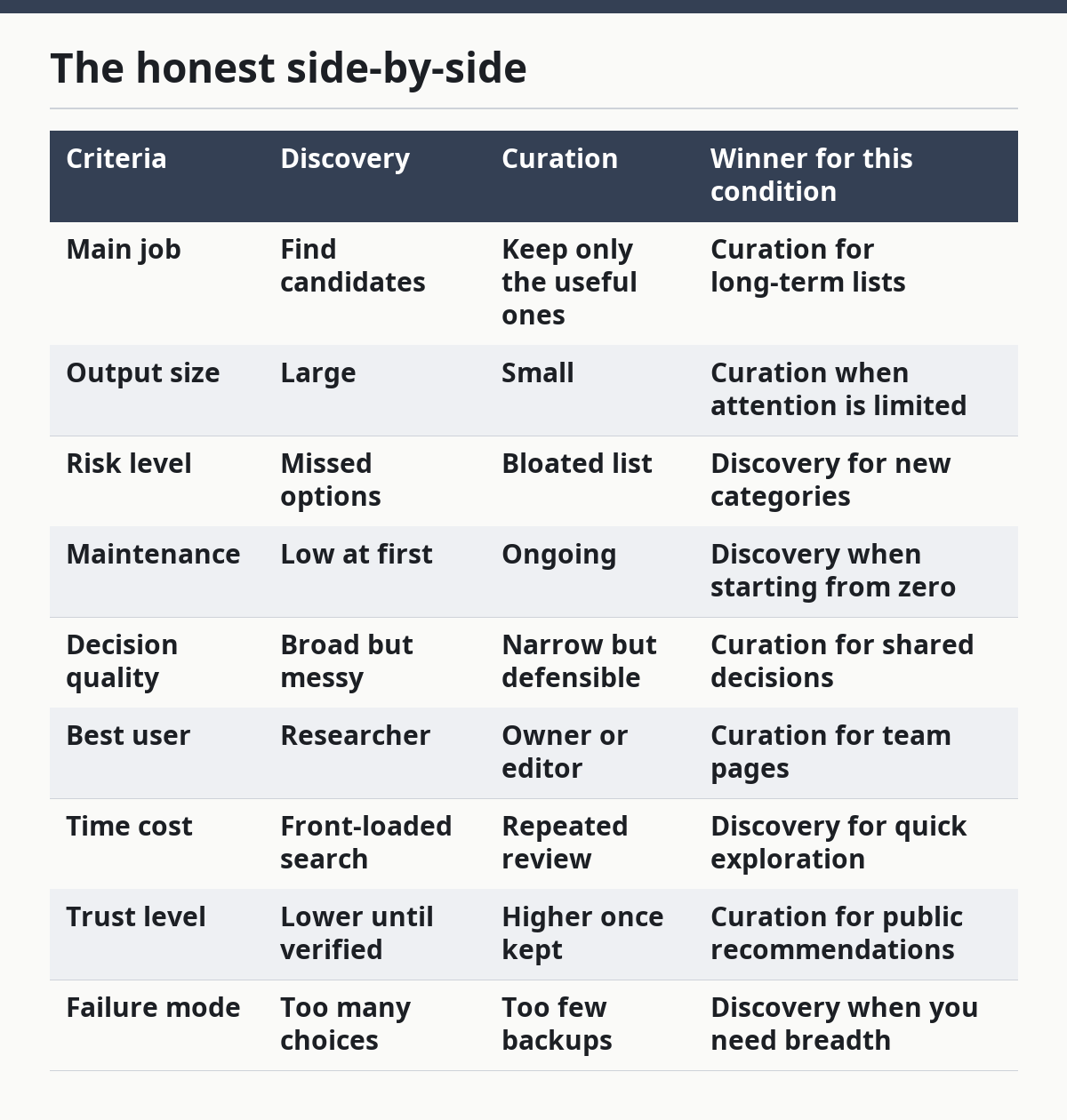
A smart process uses both. First, discover widely. Then curate hard. If you skip the second half, your list ages badly. If you skip the first half, you may miss the better option entirely. In practice, that usually means one discovery sprint, one review sprint, and one decision log.
When to reconsider the whole stack
Sometimes the right move is not to curate harder; it is to step back and question the stack itself. If you keep patching one category with more tools, the real issue may be a broken workflow.
Picture this: you’re adding another app to fix a problem that already has two workarounds. That’s a warning sign. Three tools for one job is often one too many.
Reconsider the stack when:
- A tool only exists to bridge a bad process
- Two tools do nearly the same thing
- The team keeps working outside the tool
- The cost of switching is lower than the cost of staying
- No one can explain why a tool is still on the list
This is where a lot of tool curation goes soft. People keep old software because nobody wants to own the cleanup. That delays the real decision. If the workflow itself is the bottleneck, the fix may be process design rather than another subscription.
Sometimes the cleanest answer is fewer tools, not better ones.
The verdict: how to choose and keep the right tools
Choose discovery if you’re starting from a blank slate or entering a new category. Choose curation if you already have options and need a list that people can trust and maintain. Neither if the real problem is a broken workflow that needs fewer tools, not more.
Picture this: you’re under pressure to make the stack “better” by next week. The fastest way to fail is to add another app without a rule for keeping it. The winning move is a repeatable filter, a short list, and a review date.
A simple operating rule works well:
- Discover widely when the category is new
- Curate tightly when the list is public or shared
- Retire tools that no longer earn their place
- Recheck anything that depends on current pricing, support, or integrations
If you keep those rules, the list stays useful. If you don’t, it turns into a scrapbook of old decisions. A clean list is not static; it is reviewed, dated, and trimmed.
FAQ
How many tools should be on a curated list?
A curated list should be short enough to scan fast and long enough to cover real needs. For many use cases, that means a handful per category, not a giant catalog. If a list takes more than a minute to understand, it probably has too much on it.
Should I use AI to find tools?
Yes, but only as a starting point. AI can widen the search and group options quickly, but it can also miss context or repeat outdated claims. Every important claim still needs a check against the vendor’s own docs.
What is the biggest mistake in tool curation?
The biggest mistake is keeping a tool because it was once useful. That turns a list into an archive. A current list needs a rule for removal, not just a rule for addition.
How often should I review a tool list?
Review it on a schedule that matches how fast the category changes. Quarterly works for many teams; fast-moving software may need monthly checks. If pricing, support, or integrations shift often, the review cycle should be tighter.
What should I do first if I have too many tools?
Start by naming the actual job each tool serves. If two tools solve the same job and only one has a clear edge, cut the weaker one. If you can’t explain why a tool is there in one sentence, it is probably the first one to remove.
Drafted with AI; not yet reviewed by a person.
