
Last updated: November 19, 2026
Quick Answer: How to Re-Engage Inactive Newsletter Subscribers usually takes 1 win-back email, 1 reminder, and a sunset policy after 2 to 3 messages. A subscriber re-engagement campaign works best when it is short, specific, and tied to a sunset policy. Start with one win-back email, follow with a small preference refresh, and then stop mailing the people who do not signal interest after a set period.
Key takeaways
- Inactive subscribers are not all the same, so segment them by recent engagement before you send anything.
- A win-back email should ask for one clear action, not a long survey.
- A preference refresh helps save readers who still want the newsletter, but want less of it or a narrower topic.
- A sunset policy protects deliverability by removing people who stay cold after the campaign.
- If the list is full of silence, pause outreach before it turns into open-rate decline across the whole send.
What counts as inactive?
Inactive subscribers are people who have stopped showing engagement over a clear window, usually measured by opens, clicks, or site visits tied to the newsletter. The point is not to label everyone who missed one issue; the point is to find readers who have gone quiet for long enough that a direct check-in makes sense.
That window should fit the newsletter’s send pace. A daily newsletter and a weekly newsletter cannot use the same timing, and a free AI–tools newsletter often has sharper topic churn than a general interest list. If the audience changes fast, the inactive segment should be tighter, not looser.
A simple way to define the segment is to sort by recent engagement signals, then move only the quietest group into re-engagement. For example, someone who opened last month and clicked once is very different from someone who has not opened for several sends in a row. The first person may only need a topic shift; the second may need a sunset policy.
One reliable source for deliverability thinking is Google’s sender guidance on bulk email. It stresses sending mail people want and keeping lists clean: https://support.google.com/mail/answer/81126?hl=en. Mailchimp’s deliverability guidance also explains why low engagement can hurt inbox placement: https://mailchimp.com/resources/email-deliverability/. If you are unsure how to apply that guidance to a specific list, consult a deliverability professional.
How do you build a subscriber re-engagement campaign?
A subscriber re-engagement campaign is built around one clear ask, one short follow-up, and one cutoff date. The goal is to recover the readers who still want the newsletter without dragging the whole list through months of low response.
Use this order:
- Segment the inactive subscribers in your email tool by engagement signals from the last few sends, then isolate the coldest group first.
- Write a win-back email with one subject line, one reason to stay, and one action such as “keep getting this newsletter” or “update preferences.”
- Send the first email to that segment only, so the result reflects their behavior and not the full list.
- Wait a short, fixed period before the next message, then send one reminder to the same segment if there is no response.
- Move non-responders into a sunset policy, then stop regular sends to that group unless they later show a new engagement signal.
- Record who clicked, who updated preferences, and who stayed silent, so the inactive segment stays current the next time you run the campaign.
The campaign should stay small. Two to three messages is enough for most lists because a long series of reminders starts to look like pressure, not a preference check. That is especially true for a newsletter about free AI tools, where readers often sign up for a narrow use case and leave once their needs change.
A useful standard here is segmentation by behavior, not by guesswork. If the email tool can filter on opens, clicks, or recent activity, use that instead of broad assumptions. The cleaner the segment, the less likely a good reader gets treated like a lost one, but if you are not confident in the setup, consult a deliverability professional before mailing.
What should a win-back email say?
A win-back email should say why the newsletter still matters, what has changed, and what the reader can do in one click. The message should be short enough to scan on a phone in under a minute, because the target reader is already half gone.
Keep the email focused on one of three actions: stay subscribed, change preferences, or leave. Do not ask the reader to answer five questions, update a profile, and read three paragraphs before the button appears. The more steps you add, the lower the response.
A clean structure looks like this:
| Part of email | What it should do | What to avoid |
|---|---|---|
| Subject line | Signal a simple check-in | Cute wording that hides the point |
| First line | Name the reason for the email | Long apology or brand history |
| Main ask | Offer one clear choice | Three or four calls to action |
| Footer | Give an easy opt-out | Hiding unsubscribe or preferences |
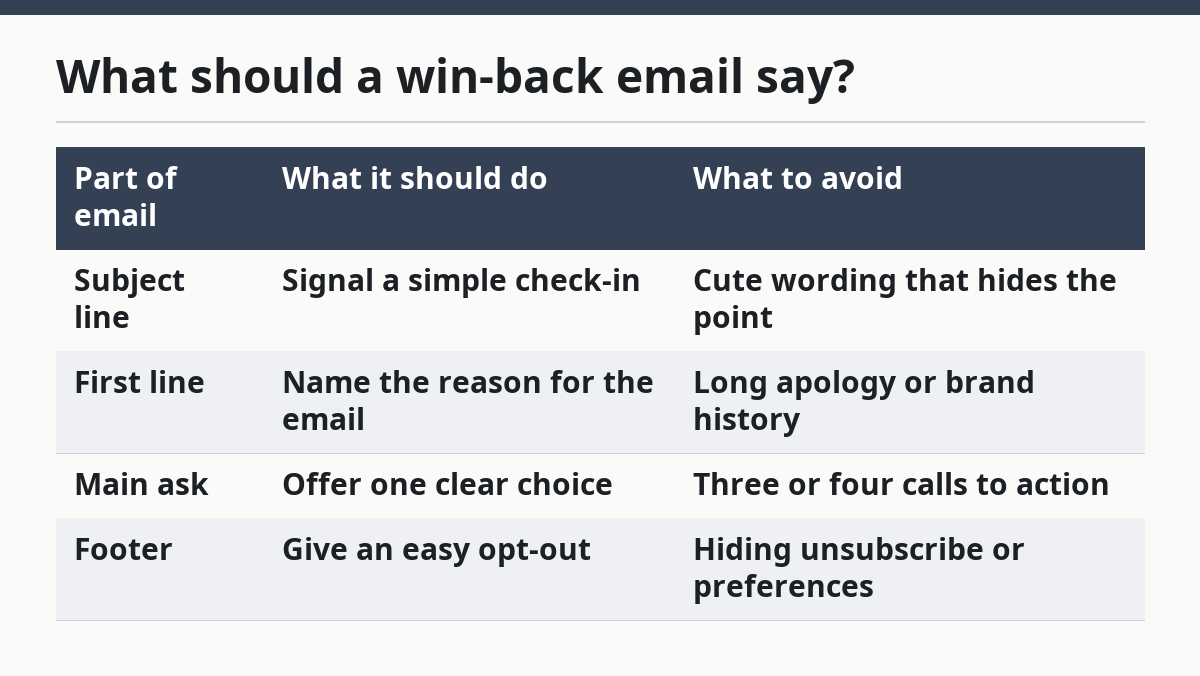
This is also the place to use a preference refresh. A reader may not want every issue, but may still want one topic, one format, or one shorter cadence. That is different from churn, and it is why a re-engagement campaign should not be written like a final goodbye from the start.
The main trade-off is blunt: a very short email gets fewer explanations, but it gets more completions. A long email may feel more thoughtful, yet it often loses the reader before the button.
Which engagement signals matter most?
The most useful engagement signals are opens, clicks, recent site visits from the newsletter, and direct preference updates. Opens alone are weaker than they used to be, so clicks and other actions deserve more weight when the tool provides them.
The practical mistake is to treat every no-open subscriber as equally inactive, but a professional should review edge cases before any broad rule is applied. Some readers use image blocking, some skim in preview panes, and some read only when a topic hits a specific need. That is why a multi-signal view works better than a single metric.
A simple ranking can help:
| Signal | What it suggests | How much weight to give it |
|---|---|---|
| Click | Active interest | High |
| Preference update | Strong intent to stay | High |
| Open | Light interest | Medium |
| No recent action | Possible loss of interest | Low to medium |
| Unsubscribe | Clear stop signal | Final |
If the email platform shows open-rate decline across several sends, do not assume the list is “bad” right away. First check whether the topic has drifted, the cadence has changed, or the same inactive group is distorting the average. A small segment with poor response can make the whole list look weaker than it is.
The important point is this: engagement signals should decide who gets the campaign, who gets a softer version, and who gets removed. They should not be used as a blunt score that turns every quiet reader into dead weight.
When should you pause outreach?
Pause outreach when the inactive segment is large enough that another send would mostly add noise, not recovery. If the list is already showing open-rate decline and the last re-engagement email got little reaction, keep mailing the main list but stop chasing the cold group until the segment is cleaned.
That pause matters because repeated sends to cold readers can hurt deliverability and muddy the data. A newsletter that keeps hammering the same quiet inboxes may learn nothing useful and may keep the wrong people in circulation. For a free AI–tools newsletter, that can be worse than a smaller list, because tool news changes fast and stale addresses age quickly.
A pause does not mean giving up on the reader forever. It means ending the active campaign, moving the non-responders into a sunset policy, and waiting for a fresh signal before they return to normal sends. If someone clicks again later, they can re-enter the engaged group.
This is the right time to be honest about who the method is not for. A brand-new list with only a handful of issues does not need a hard sunset policy yet. A list with healthy click activity also does not need a heavy reactivation push, because the cost of over-mailing can be higher than the benefit of one more recovery attempt.
How do you set a sunset policy?
A sunset policy sets the rule for when inactive subscribers leave the active list or move to a lower-contact state. It gives the campaign a stop line, so re-engagement does not become endless retrying.
The rule should be written before the campaign starts. Pick the engagement signals that count, decide how many failed attempts are enough, and state what happens next. For many newsletters, that next step is removal from regular sends, not a permanent ban from every future email.
The policy should also define the difference between inactive and unreachable. A person who has not clicked in months is not the same as a bad address, but both can hurt list quality if they stay in the main stream. The first is a content problem; the second is a list hygiene problem.
A fair sunset policy often has three parts:
- one win-back email
- one reminder
- one removal or suppression step
That is enough structure without turning the campaign into a long chase. It also protects the engaged readers, because they stop sharing inbox space with addresses that no longer care.
The drawback is obvious: some people will leave who might have come back later. That is the price of a clean list. For a newsletter built around free AI tools, a smaller active list is usually better than a larger silent one, because the topic depends on fast attention and current need.
What mistakes waste the campaign?
The biggest mistake is sending the same generic email to every inactive subscriber. That wastes the only shot you often get, because the message feels like mass mail instead of a useful check-in.
A second mistake is waiting too long. If the list goes silent for months before anyone acts, the campaign starts from a weaker place and the open-rate decline is harder to reverse. A third mistake is using too many steps, which turns a simple re-engagement ask into admin work.
Here are the errors that cost the most:
- No segmenting. This sends the wrong message to the wrong reader and hides what worked.
- No cutoff date. This keeps cold contacts in the system and makes the list harder to trust.
- Too many choices. This lowers response because the reader has to think too hard.
- No preference refresh. This loses people who would have stayed for a narrower topic or slower cadence.
The fix is to keep the campaign plain. Short copy, one action, one reminder, one sunset policy. That is enough for a how-to campaign because the goal is not persuasion theater; it is deciding who still wants the newsletter and who does not.
FAQ
when should you email inactive subscribers?
Email inactive subscribers after you have enough recent silence to make the segment meaningful, not after one missed send. The right moment depends on the newsletter’s cadence and the strength of the engagement signals. A weekly list and a daily list should not use the same timing, and the campaign should begin before open-rate decline becomes the new normal.
how do you know a subscriber is inactive?
A subscriber is inactive when recent opens, clicks, and other engagement signals have dropped off enough to justify a separate segment. One quiet issue is not enough. The stronger sign is repeated silence across several sends, especially when the rest of the list is still reacting.
should inactive subscribers be removed from a list?
Inactive subscribers should usually be moved out of the active send list if they do not respond to a short re-engagement campaign. That keeps the list cleaner and makes future engagement data easier to trust. A sunset policy is often better than keeping silent contacts in regular mail forever, though a later click can always bring someone back.
Drafted with AI; not yet reviewed by a person.
